




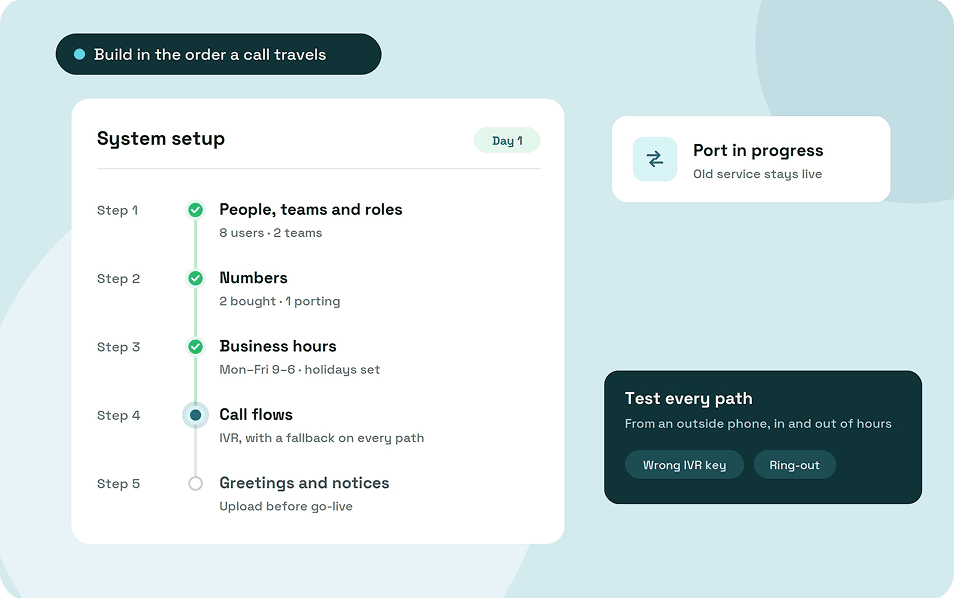
Business phone system installation for a cloud system happens in five phases: prepare your numbers and network, build the system in the order a call travels, test every call path, port your numbers and go live, then review the first 30 days.
Most of the build fits in a day. Porting your existing numbers usually takes the longest, so start it early and keep your old service running until it completes.
Key takeaways
- Prepare before you log in: list every number you own, check your network and map your call flows.
- Build in the order a call travels: users and teams, numbers, business hours, call flows, then greetings.
- Test every path, including after hours, wrong IVR keys and unanswered calls, before your customers find the gaps.
- Port without cancelling the old service, train staff by role and review missed calls after 30 days.
What business phone system installation looks like now
Installing an on-premises PBX meant a technician, a server cupboard, and new wiring. A cloud system runs in the provider's data centers, so the installation happens in a web portal instead of your office.
That's why phone system installation for small business teams now comes down to a login, a decent internet connection, and a headset that works.
Costs have moved the same way.
Instead of paying upfront for a PBX, phone system installation for small business owners usually means a monthly fee per user, plus headsets, any porting fees and caller ID registration.
How much does business phone system installation cost?
A cloud system has almost no installation cost in the old sense, because there's no PBX to buy and no wiring to run. What you pay splits into a few one-time costs and a monthly bill:
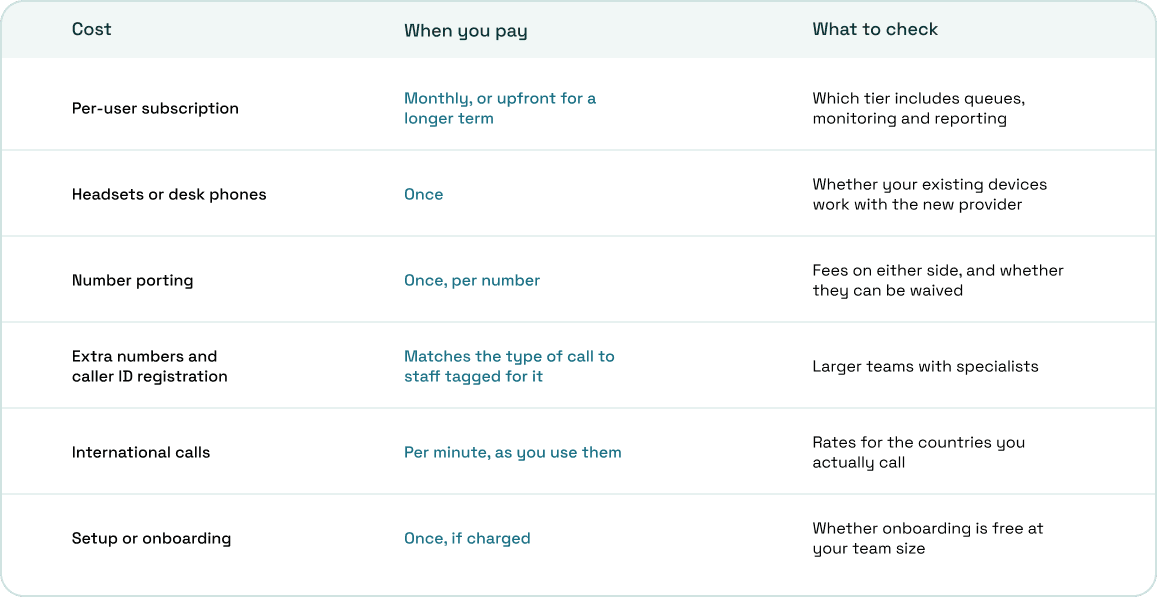
For phone system installation for small business teams, the subscription is usually the biggest line, so compare plans at the tier you'll actually need rather than the entry price.
Before you log in
Most setup problems start before anyone opens the admin portal. Gather these first:
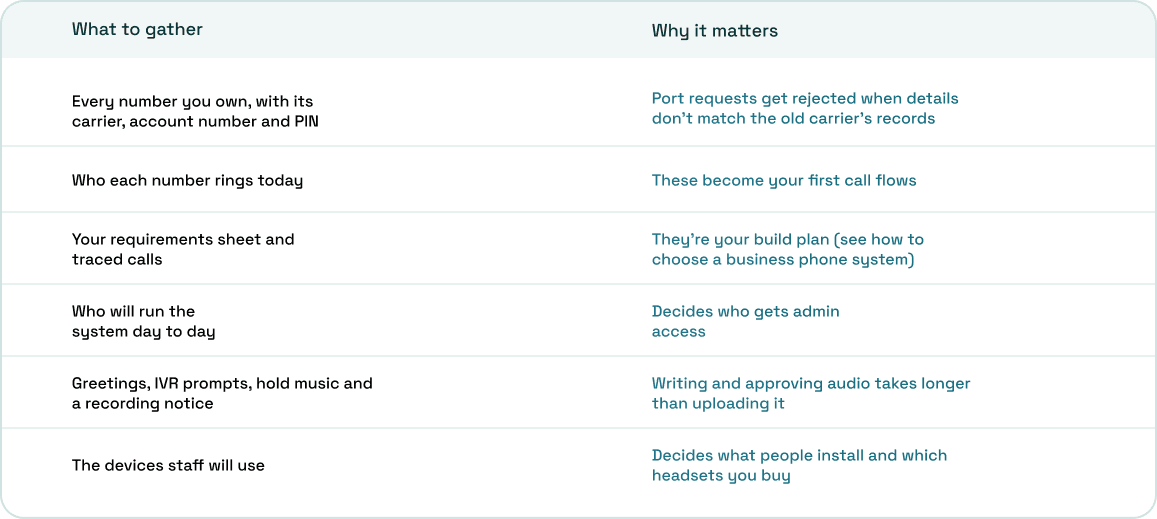
If you haven't traced your current calls yet, do it now. Ten real calls, followed from first ring to final outcome, tell you more about the call flows you need than any template.
Business phone system and network installation
Treat business phone system and network installation as one job. Every business VoIP phone system installation depends on the connection underneath it, and most "bad call quality" complaints trace back to the office network rather than the provider.
Start with the numbers. A standard G.711 call uses about 87 kbps in each direction over Ethernet, so multiply that by the most calls you expect at the same time and leave headroom for everything else.
Speed matters less than stability, though:
- Put your heaviest callers on wired connections rather than Wi-Fi
- Turn on quality of service (QoS) so the router puts voice traffic ahead of downloads
- Ask your provider for its recommended router and firewall settings before go-live
Plan for outages too. Some VoIP services stop working when the power goes out, so decide in advance whether staff switch to mobile data or you forward calls to a mobile.
How to set up a business phone system in the order a call travels
Build in the same order a call moves through the system. Each stage depends on the one before it, so working out of order means going back to fix things.
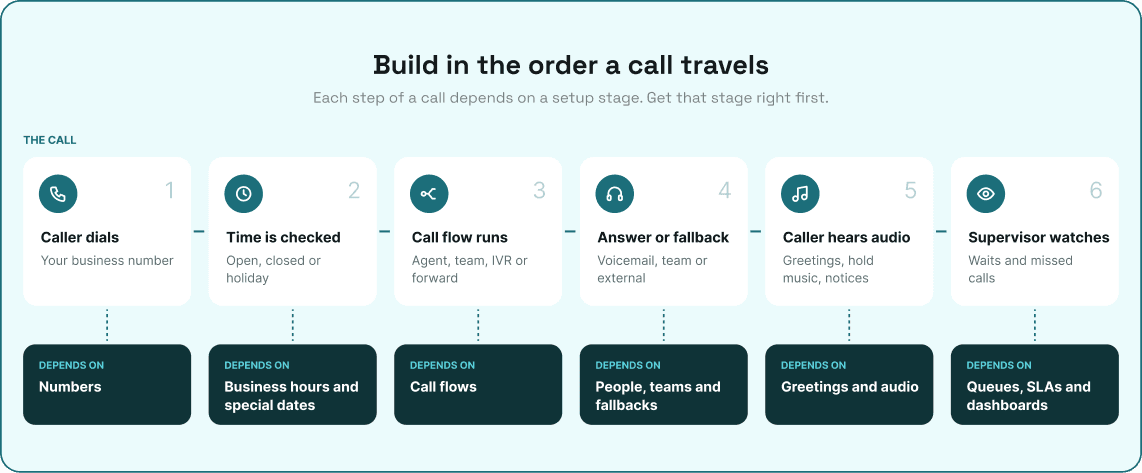
1. People, teams and roles
Calls need somewhere to land, so start with your people. Invite every user, group them into teams that match how calls get answered, and give admin access to as few people as you can.
Then set each user's call settings: how long a call rings before it falls back, their voicemail greeting, hold music, and whether calls are recorded.
2. Numbers
Buy any new numbers you need, or start porting your existing ones (covered below). Assign each number to the person or team that should answer it. Register your business name for caller ID at the same time, since approval can take a while.
3. Business hours and special dates
Set opening hours for each number, then add public holidays and other special dates. Do this before building call flows, because every call flow behaves differently in and out of hours.
4. Call flows, with a fallback for every path
Choose what each number does: ring one person, ring a team, play an IVR menu ("press 1 for sales"), or forward to another number. Then answer the question most setups skip: what happens if nobody picks up?
Every path needs a fallback, such as voicemail, another team or an external number. For IVR menus, decide what callers hear when they press nothing or press the wrong key.
5. Greetings, hold music, and notices
Upload your main greeting, IVR prompts, hold music, recording notice and any forwarding announcement. Keep each one short, and write down where it's used so you remember to update it when your hours change.
6. Queues, SLA targets and dashboards
If you run a support or sales line, set how long a call rings the team before it times out, an SLA target for how fast calls should be answered, and who watches the live view. Skip this stage if everyone on your team simply answers the same number.
Port your numbers without dropping calls
Porting moves your existing numbers from the old carrier to the new provider. The FCC's porting guide sets out a few rules worth knowing:
- Simple ports should take one business day
- Don't cancel your old service before the port goes through
- Your old carrier can't refuse to port your number, even if you owe it money
- Porting fees may apply, but you can ask for them to be waived
The Letter of Authorization has to match the old carrier's records exactly, including the account holder, account number, PIN and service address. Build and test your call flows before the port date, so calls land in the right place from the first minute.
Once the numbers arrive, make a test call to a mobile. Your business name should show where caller ID registration is approved, and calls signed through STIR/SHAKEN are less likely to get flagged as spam.
Test every call path before go-live
Your customers shouldn't be the ones who find a broken call flow. Test from an outside phone, not an internal extension, and run the same tests during and outside business hours.
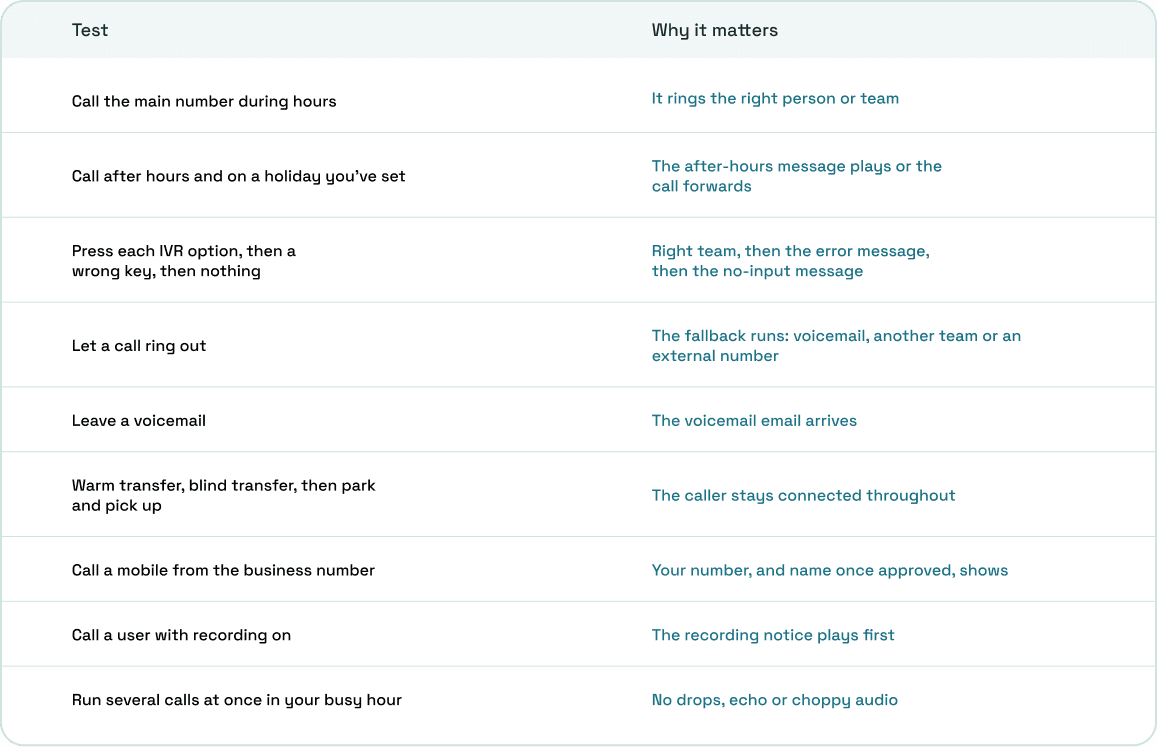
Write down every failure, fix it, then run the whole table again. A fix to one call flow can quietly break another.
Emergency calling and compliance
Check emergency calling before anyone takes a live call. Under Kari's Law, multi-line phone systems must let users dial 911 without a prefix and alert a central point when someone does, while RAY BAUM'S Act requires 911 calls to pass on a dispatchable location, such as a street address with a floor or room number.
Keep every user's address current, especially for remote staff. If you record calls, turn on a recording notice wherever callers might be in an all-party consent state.
Train your team by role
One long session for everyone wastes most people's time. Train by role instead:
- Agents: answering, warm and blind transfers, call park, notes, statuses and voicemail
- Supervisors: the live view, queues, SLA targets and listening in on calls
- Admins: changing hours, call flows and greetings without waiting on support
Leave a one-page cheat sheet beside every desk for the first two weeks.
Go live and review the first 30 days
Pick a go-live time outside your busy hour, keep the old service active until the port completes, and have one person watching the live dashboard. Problems on day one are easier to fix when someone spots them in minutes.
In the first week, check missed and dropped calls, voicemails nobody returned, and callers who got stuck in the IVR. Ask staff where they're working around the system, since workarounds point straight at a setting that's wrong.
After 30 days, rerun your call volume numbers and compare them with what you planned. Adjust ring times, fallbacks, team members and SLA targets based on what actually happened. When a customer says they couldn't get through, trace that one call before you change anything.
Setting up ArcSIP
ArcSIP's setup follows the same order a call travels. You can sign up instantly and start a 7-day trial with no credit card and one free number.
- Numbers: search by country, state, city and capability, buy one or several, and they land in your inventory ready to use. Port existing numbers with a Letter of Authorization and track each request's status, and register CNAM the same way.
- People: invite users as Owner, Admin, Supervisor or Agent, and set each user's ringing time, hold music, voicemail greeting, recording and recording notice. Teams get their own ring timeout.
- Call flows: ring to agent, ring to team, multi-level IVR or forward to number, with business hours, special dates and after-hours fallbacks set per number. Greetings, IVR prompts and hold music live in one audio library.
- Testing and review: Call Journey shows every step a test call took, with timestamps and reasons. The dashboard tracks longest wait in queue, calls answered on time, and missed and dropped calls from day one.
ArcSIP Unlimited costs $29 per user per month, with a three-user minimum.
Set it up once, then keep it tuned
Business phone system installation doesn't end on go-live day. Prepare your numbers and network, build in the order a call travels, and test every path before customers use it.
Then give it 30 days and look at the numbers again. The system you tune after launch is the one your team will still be happy with a year from now.