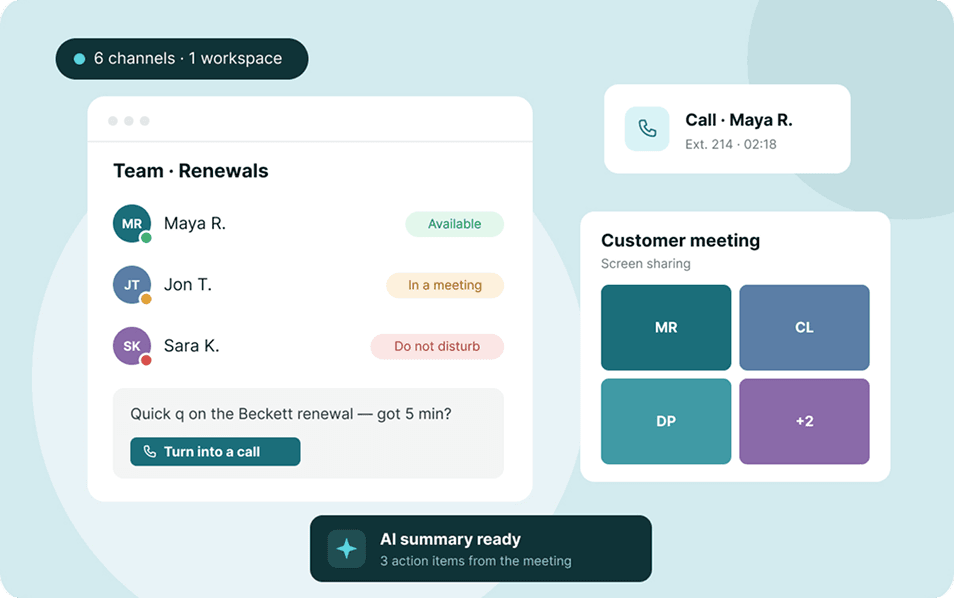



VoIP and UCaaS often appear on the same pricing pages, and plenty of providers use the two terms as if they mean the same thing. They don't, and picking the wrong one can leave your team paying for features it never touches or juggling apps it didn't need to.
The difference comes down to scope.
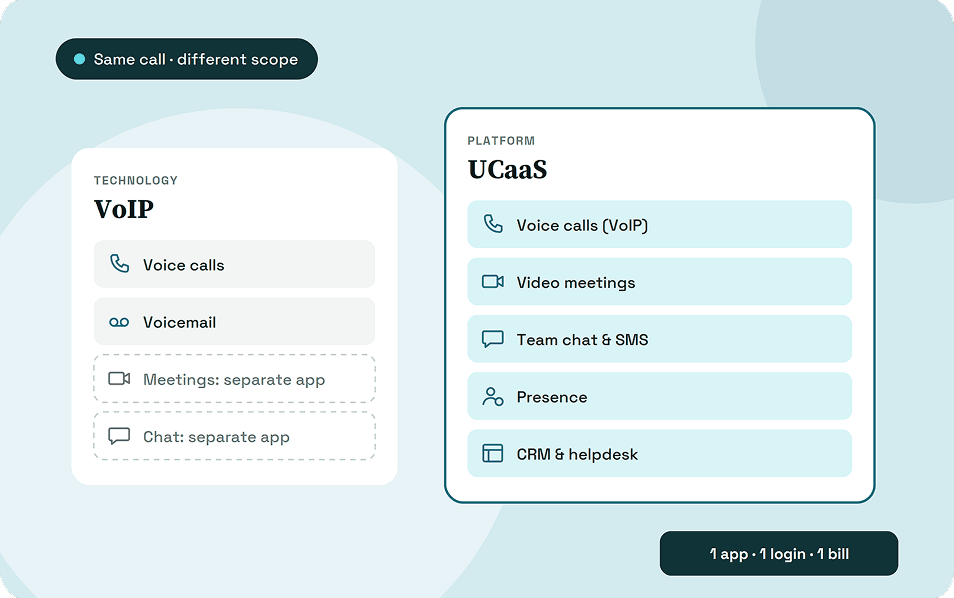
VoIP (Voice over Internet Protocol) is a technology that carries phone calls over the internet instead of copper lines. UCaaS (Unified Communications as a Service) is a cloud platform that combines VoIP calling with video meetings, team chat, presence, file sharing, and business app integrations under one subscription.
Every UCaaS platform uses VoIP, but a VoIP service on its own covers voice only.
Key takeaways:
- VoIP is a technology for voice calls; UCaaS is a full communication platform built on top of it.
- A VoIP service replaces your phone system. UCaaS replaces your phone system plus your separate meeting, chat, and presence tools.
- VoIP usually costs less per user, but UCaaS can cost less overall once you count the tools it replaces.
- Pick VoIP if your team mostly talks on the phone, and UCaaS if work moves between calls, chat, and meetings all day.
What Is VoIP?
VoIP (Voice over Internet Protocol) lets you make and receive phone calls over an internet connection instead of a traditional landline. It turns your voice into digital data and sends it across the same network that carries your email and web traffic.
A business VoIP plan usually covers
- IVR menus ("Press 1 for sales")
- Call forwarding and transfers
- Call parking
- Ring groups
- Basic call queues
A landline holds a dedicated circuit open for the whole call. VoIP breaks the call into small data packets that share the network with everything else, which is why it costs less and also why your internet quality matters so much.
How VoIP Works
Every VoIP call goes through four steps:
- Digitization
- Packetization
- Transmission
- Reassembly
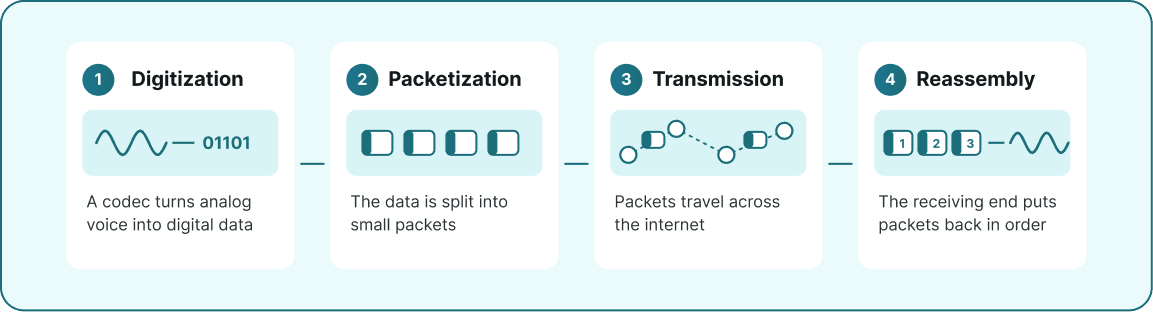
Two protocols run behind every call. SIP (Session Initiation Protocol) sets up the call, rings the other side, and ends the session when someone hangs up, while RTP (Real-time Transport Protocol) carries the audio in between. Its encrypted version, SRTP, protects that audio from eavesdropping.
Types of Business VoIP
Most businesses buy hosted VoIP, also called a cloud PBX, where the provider runs the phone system in its data centers and you manage it from a web portal for a monthly per-user fee.
An on-premise IP-PBX keeps the hardware in your office, which gives you full control but needs IT staff to maintain it.
SIP trunking sits in between. It connects your existing PBX to the phone network over the internet, replacing older PRI or analog lines, so you can modernize without retiring the system you already own.
What is UCaaS?
UCaaS (Unified Communications as a Service) is a cloud platform that puts every way your team communicates into one app. It includes phone calls, video meetings, team chat, presence, and file sharing. You pay for it as a subscription, there's no hardware to install, and it runs on desktop, browser, and mobile.
VoIP handles the calling inside a UCaaS platform. What UCaaS adds is everything around those calls, and the links between them.
What a UCaaS Platform Includes
Gartner splits UCaaS into six functions. In practice, that means:
- Business phone calls: VoIP calling with numbers, extensions, IVR, and call routing.
- Video meetings: One-on-one video calls, team meetings, and webinars with screen sharing and recording.
- Team chat and messaging: Direct messages, group channels, and file sharing, with voicemail and often SMS in the same inbox.
- Presence: A live status (available, on a call, in a meeting, away) that tells you who to reach and how.
- Apps for every device: The same account, contacts, and history on desktop, browser, and mobile.
- Business app integrations: Connections to CRMs, helpdesks, calendars, and on some platforms, contact center tools.
How UCaaS Works
A UCaaS platform runs entirely in the provider's cloud, usually spread across several data centers so a single outage doesn't take you offline. Inside it, three layers do most of the work:
- VoIP and WebRTC carry voice and video, through an app or straight from a web browser.
- A single user identity ties your number, chats, meetings, and presence together.
- APIs connect the platform to your CRM, helpdesk, and calendar.
That shared identity is what makes UCaaS feel like one tool. A chat thread can become a voice call, the call can become a video meeting, and your CRM logs it the moment it ends, without anyone switching apps.
UCaaS vs VoIP: At a Glance
VoIP is one layer of a UCaaS platform. Buy VoIP and you get that layer on its own; buy UCaaS and you get the layer plus every other channel your team uses around it.
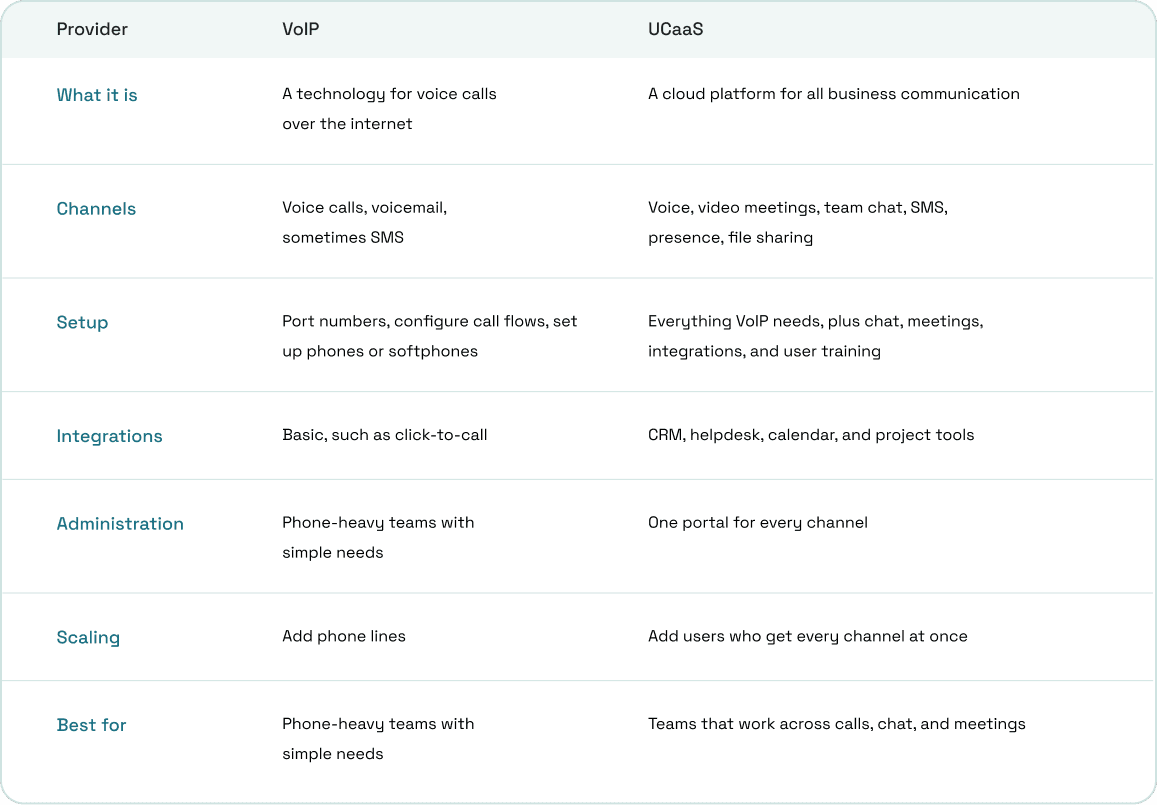
UCaaS vs VoIP: A Head-to-Head Breakdown
VoIP and UCaaS can look alike on a feature list, yet they play out very differently once your team starts using them. Here's how each difference affects your budget, your IT workload, your network, and your compliance obligations.
Scope and Channels
VoIP answers one question: how does your business make phone calls? UCaaS answers a wider one, which is how your team talks to each other and to customers on any channel.
- With VoIP, the call is the whole interaction. Chat, video, and file sharing sit in other apps with separate logins.
- With UCaaS, a chat can turn into a call, the call can add video and screen sharing, and the recording lands back in the same thread.
Cost
VoIP usually wins on per-user price, but the seat price rarely tells you what you'll actually spend. Before you compare, add up:
- Taxes and regulatory fees, which sit on top of the advertised price for both
- International rates and add-ons such as toll-free numbers or branded caller ID
- The meeting, chat, and file-sharing subscriptions you'd still pay for alongside VoIP
- IT time spent managing several vendors instead of one
Once those are counted, a cheaper VoIP plan can end up costing more than a single UCaaS subscription.
Setup and Management
A VoIP rollout means porting numbers, building call flows, and handing out desk phones or softphone apps. UCaaS adds chat, meeting rooms, integrations, and training on top, so it takes longer to launch but leaves you with one admin portal instead of several.
Integrations
Most VoIP services stop at basic integrations like click-to-call. UCaaS platforms connect to your CRM and helpdesk so caller details appear before you answer and every call, chat, and meeting logs itself.
Scaling
Both scale by adding users in a portal rather than running new lines. The difference is what a new hire gets: with VoIP, a phone number; with UCaaS, a number, chat account, meeting room, and presence status on every device they use.
Network Requirements
Both run on your internet connection, so call quality depends on it.
- Bandwidth: Plan for roughly 100 kbps per user on calls UCaaS video meetings need considerably more.
- Latency: Keep one-way delay under 150 ms for a natural conversation.
- Jitter and packet loss: Both cause choppy or robotic audio. Quality of Service (QoS) rules on your router fix most of it by putting voice traffic ahead of downloads.
Security, Compliance, and 911
VoIP and UCaaS share the same US calling rules. UCaaS has more to protect, though, because it also stores chats, files, and recordings.
- Encryption: Look for TLS on call signaling and SRTP on audio. A UCaaS provider should also encrypt messages, files, and meeting recordings.
- 911 location: The FCC requires interconnected VoIP providers to collect your physical address before activating service. Under RAY BAUM's Act, fixed VoIP has had to send a dispatchable location with 911 calls since January 6, 2021, and non-fixed VoIP since January 6, 2022.
- Caller ID authentication: STIR/SHAKEN signs your outbound calls so carriers are less likely to label them as spam.
- Outages: Neither works when power or internet drops, so set up forwarding to mobile numbers as a fallback.
How the Same Customer Call Plays Out on VoIP vs UCaaS
Suppose a 20-person company gets a call from a customer about a billing error. Here's how the same issue plays out on each setup.
On VoIP plus separate apps:
- The call rings in the agent’s VoIP softphone. If the softphone is not integrated with the CRM, the agent answers first and then manually searches for the customer’s account using the caller’s name, number, or other details.
- They need someone from finance, so they message a colleague in a separate chat app and wait, with no way of knowing whether that person is free.
- Finance asks to see the invoice, so the agent sends a meeting link from a third tool and asks the customer to join.
- Afterward, the agent copies call notes into the CRM by hand. The call, the chat, and the meeting now live in three different places.
On UCaaS:
- The call rings with the customer's CRM record already on screen.
- The agent sees that the finance lead is available, pings them from the same window, and adds them to the call.
- One click turns the call into a video meeting with screen sharing.
- The call log, chat thread, and recording save to one history and sync to the CRM on their own.
The call sounds the same on both setups. What changes is how many tools the agent juggles and how much context survives after the customer hangs up.
Benefits of VoIP vs Benefits of UCaaS
Both options cut costs compared with a landline, but they pay off in different places. VoIP's gains show up on your phone bill, while UCaaS's gains show up in how much time your team spends switching tools and chasing context.
Benefits of VoIP
The most immediate saving is on the calls themselves. International calls run a few cents per minute on VoIP, compared with $1 or more on a landline, and most plans include features that landlines charge extra for:
- IVR menus
- Call routing and forwarding
- Voicemail delivered to email
- Call recording
VoIP also frees your number from the desk. It rings on a desk phone, laptop, or mobile app wherever there's internet, and adding a line for a new hire takes a few clicks in a web portal rather than a technician visit. With no chat, meeting, or integration rollout to plan, a small team can usually go live faster than on a full UCaaS platform.
Benefits of UCaaS
UCaaS keeps every VoIP benefit and adds what happens around the call. Calls, video meetings, chat, and presence share one app, one login, and one bill, so people see who's free and move from chat to call to video without leaving the conversation.
That single platform can replace several subscriptions at once:
- A separate meeting tool
- A team messaging app
- A standalone business phone service
- File-sharing tools for internal work
Integrations add customer context on top. CRM and helpdesk connections put caller history on screen and log each interaction automatically, while remote, hybrid, and office staff get the same features and history on any device. Redundant cloud data centers also keep you reachable when a single office loses power or internet.
Trade-offs to Know
- VoIP covers voice only, so you'll keep paying for and managing separate tools for meetings and chat.
- UCaaS costs more per seat and takes longer to roll out. Teams also need training before they use more than the dialer.
Which One Should You Choose?
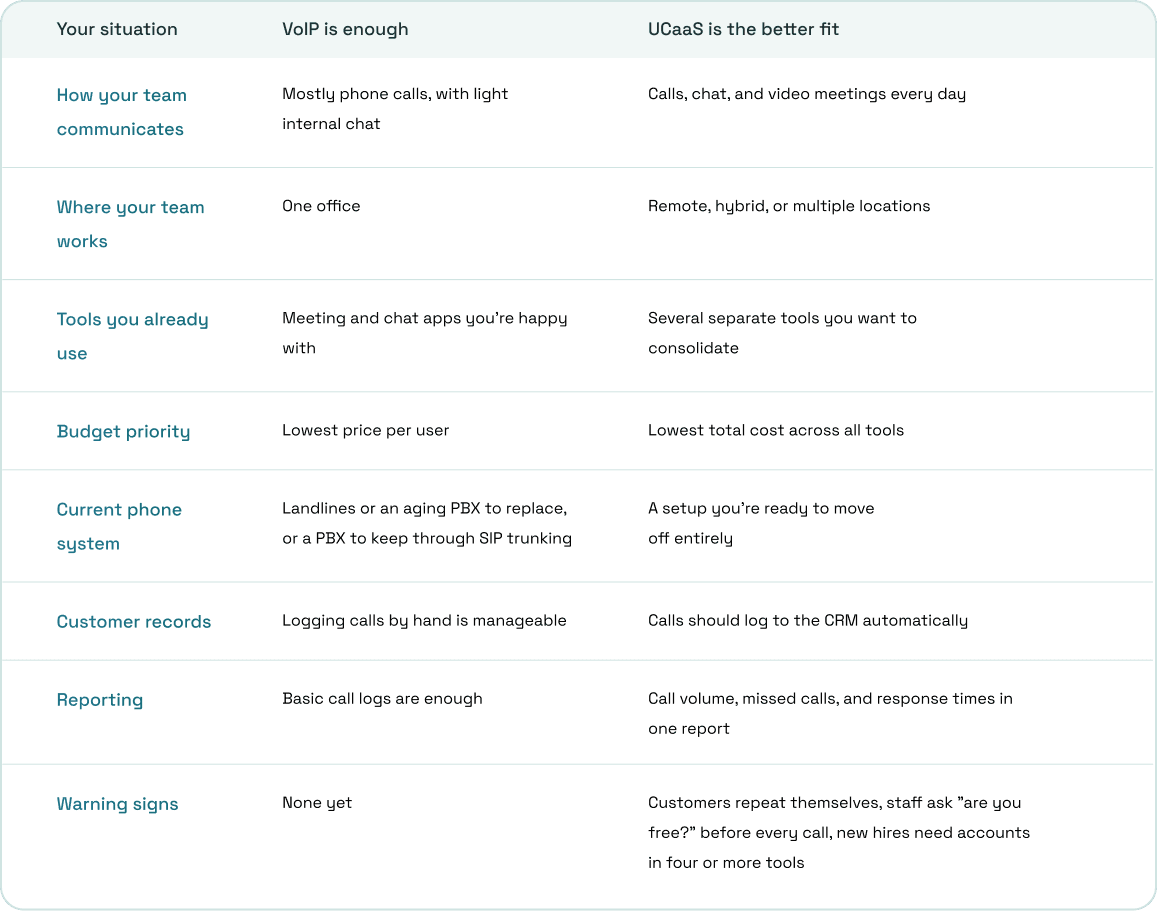
The UCaaS vs VoIP choice depends less on company size than on how your team communicates in a normal week, so find the reasons that fit your business and see which solution works best.
How to Move to UCaaS Without Disruption
Most migration problems come from rushing the cutover rather than from the new platform. Running old and new systems side by side for a short period costs a little extra, but it protects you from missed calls while numbers move over.
1. Audit What You Have
List every phone line, number, and communication tool you pay for, along with its monthly cost. This gives you a real baseline for comparing quotes and shows which subscriptions UCaaS can replace.
2. Test Your Network
Check bandwidth, latency, and jitter at every location before you sign anything. A connection that handles email and browsing without trouble can still produce choppy calls once a dozen people join video meetings at the same time.
3. Start Number Porting Early
Your new provider needs a Letter of Authorization and the account details from your current carrier, including the account number and PIN. Transfers can take a while, especially for large batches of numbers, so start them before you plan the rest of the rollout.
4. Run a Pilot
Move one team first, ideally one that handles a steady stream of calls. Their first week will expose call flow gaps, IVR mistakes, and missing integrations while the problems are still small.
5. Train Beyond the Dialer
Most teams learn to make calls on day one and never open the chat, meeting, or presence features. Show staff how to use them, or they'll drift back to the old apps and you'll end up paying for both.
6. Cut Over With a Fallback
Switch the rest of the company only after the pilot runs cleanly. Keep old lines active until every ported number is confirmed working, so no customer call goes unanswered during the move.
How ArcSIP Brings UCaaS and CCaaS Together
ArcSIP is a cloud-based platform that combines a business phone system, contact center operations, and remote calling tools. Instead of running a VoIP service, a contact center platform, and a separate chat app side by side, your team works from one workspace.
- Multi-level IVR, ring groups, call queues, warm transfers, call parking, and conference calling
- Internal team chat and user statuses next to the dialer
- Live dashboards for active calls, queues, SLA targets, and agent availability
- A browser-based softphone plus iOS and Android apps with the same features
- One platform for teams of 3 to 5,000 users
Try ArcSIP free for 7 days, no credit card required.