



Most UCaaS vs CCaaS comparisons are lazy enough to say one serves employees while the other serves customers. That distinction is useful, but incomplete for anyone actually choosing between them.
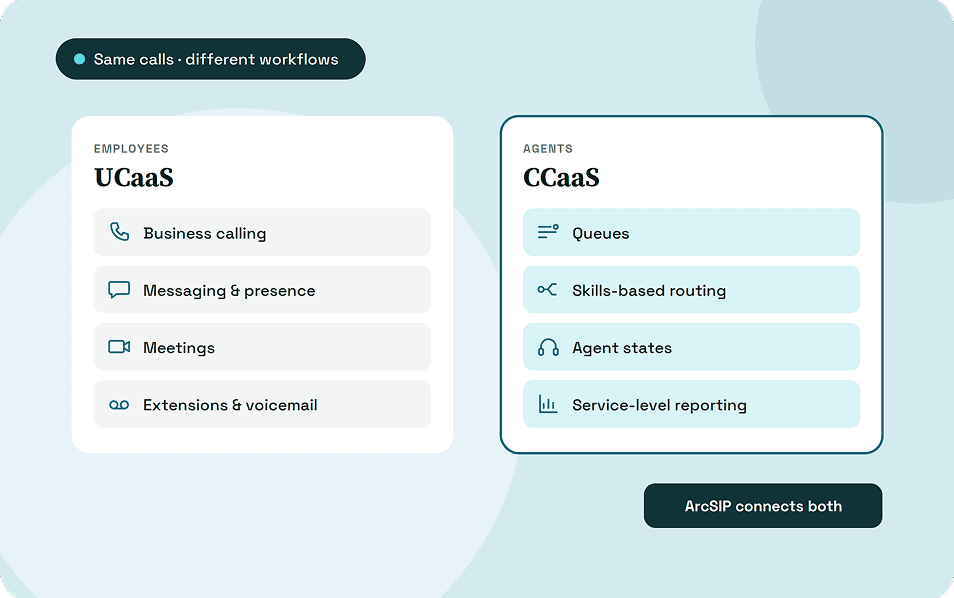
UCaaS manages broader business communication around employees, teams and business identities, while CCaaS manages customer interactions around agents, queues and service workflows. Both can handle external calls, routing, integrations and analytics.
The meaningful difference appears in what happens before, during, and after each interaction. That affects routing depth, supervision, reporting, licensing, and whether ordinary business calling is enough.
Key Takeaways
- UCaaS means Unified Communications as a Service. It combines business calling, messaging, meetings, presence, and collaboration within a cloud-based communication environment.
- CCaaS means Contact Center as a Service. It manages structured customer interactions through queues, agents, routing rules, supervision, and operational reporting.
- UCaaS is not limited to internal communication. Employees can use UCaaS to speak with customers, prospects, suppliers, partners, and colleagues.
- CCaaS is built around interaction management. Customer conversations enter operational workflows that can be distributed, monitored, measured, and reviewed.
- UCaaS and CCaaS share several capabilities. Calling, IVR, routing, recording, integrations, and analytics can appear in both systems for different purposes.
- Basic customer calling does not automatically require CCaaS. A capable UCaaS platform can often manage departments, ring groups, simple queues, and business-hour routing.
- Businesses commonly need CCaaS once customer communication becomes an operation. Dedicated agents, complex queues, service targets, and supervisor oversight are strong indicators.
- UCaaS and CCaaS can also work together. One can serve the wider workforce while the other manages formal sales, support, or service operations.
What Is UCaaS?
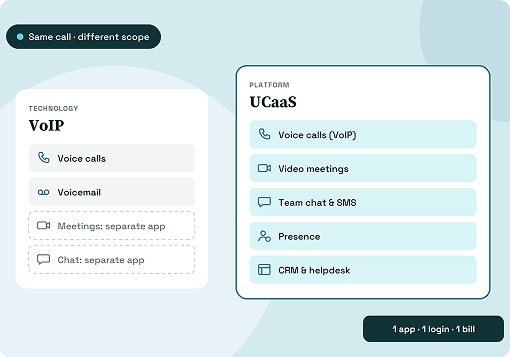
UCaaS stands for Unified Communications as a Service and delivers communication software through a hosted cloud environment. Businesses use it to connect employees across offices, homes, devices and locations.
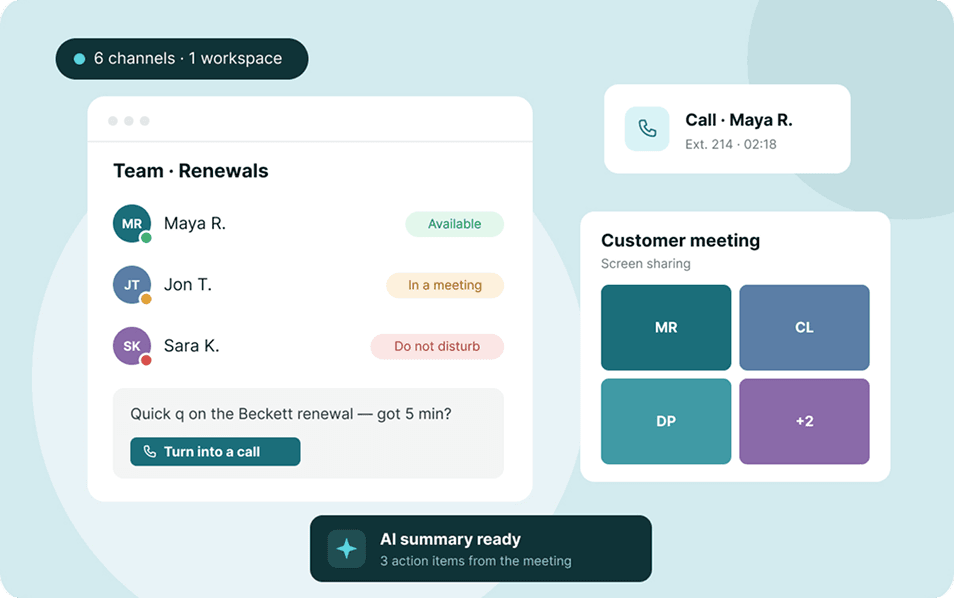
A UCaaS platform commonly combines business calling, messaging, presence, meetings, voicemail and collaboration. Employees retain a business identity without depending entirely on a physical office phone.
Typical UCaaS capabilities include:
- Business phone numbers and extensions
- VoIP calling
- Call forwarding and transfers
- Voicemail
- Auto-attendants
- Ring groups
- Presence and availability
- Direct and team messaging
- Audio and video meetings
- Browser-based calling
- Mobile calling
- Call history
- CRM integrations
- Calendar and productivity integrations
UCaaS also supports communication outside the organization, which makes the common “UCaaS equals internal communication” definition misleading. Sales representatives, account managers and employees can call customers using the same environment.
For a complete explanation of its architecture, features and deployment considerations, read our guide to Unified Communications as a Service. This comparison focuses specifically on where UCaaS separates from CCaaS.
What Is CCaaS?
CCaaS stands for Contact Center as a Service and delivers contact center capabilities through a hosted cloud environment. It is designed for structured interactions between customers and customer-facing teams.
Instead of simply connecting a caller with an employee, CCaaS can determine where an interaction belongs and who should handle it. That decision may consider queues, skills, availability, priority and customer information.
Common CCaaS capabilities include:
- Inbound and outbound calling
- Interactive voice response, or IVR
- Automatic call distribution, or ACD
- Call queues
- Skills-based routing
- Priority routing
- Agent states
- Call recording
- Call monitoring
- Dispositions
- Supervisor controls
- Quality management
- Workforce management
- Contact center analytics
- CRM integrations
- Help desk integrations
- Digital customer channels
- AI-powered agent assistance
Contact center software is the broader category, while CCaaS specifically refers to contact center functionality delivered through the cloud. An on-premises contact center can therefore exist without technically being CCaaS.
UCaaS vs CCaaS at a Glance
The difference between UCaaS and CCaaS becomes easier to understand when their operating roles are compared directly. The individual technologies often overlap more than their intended workflows.
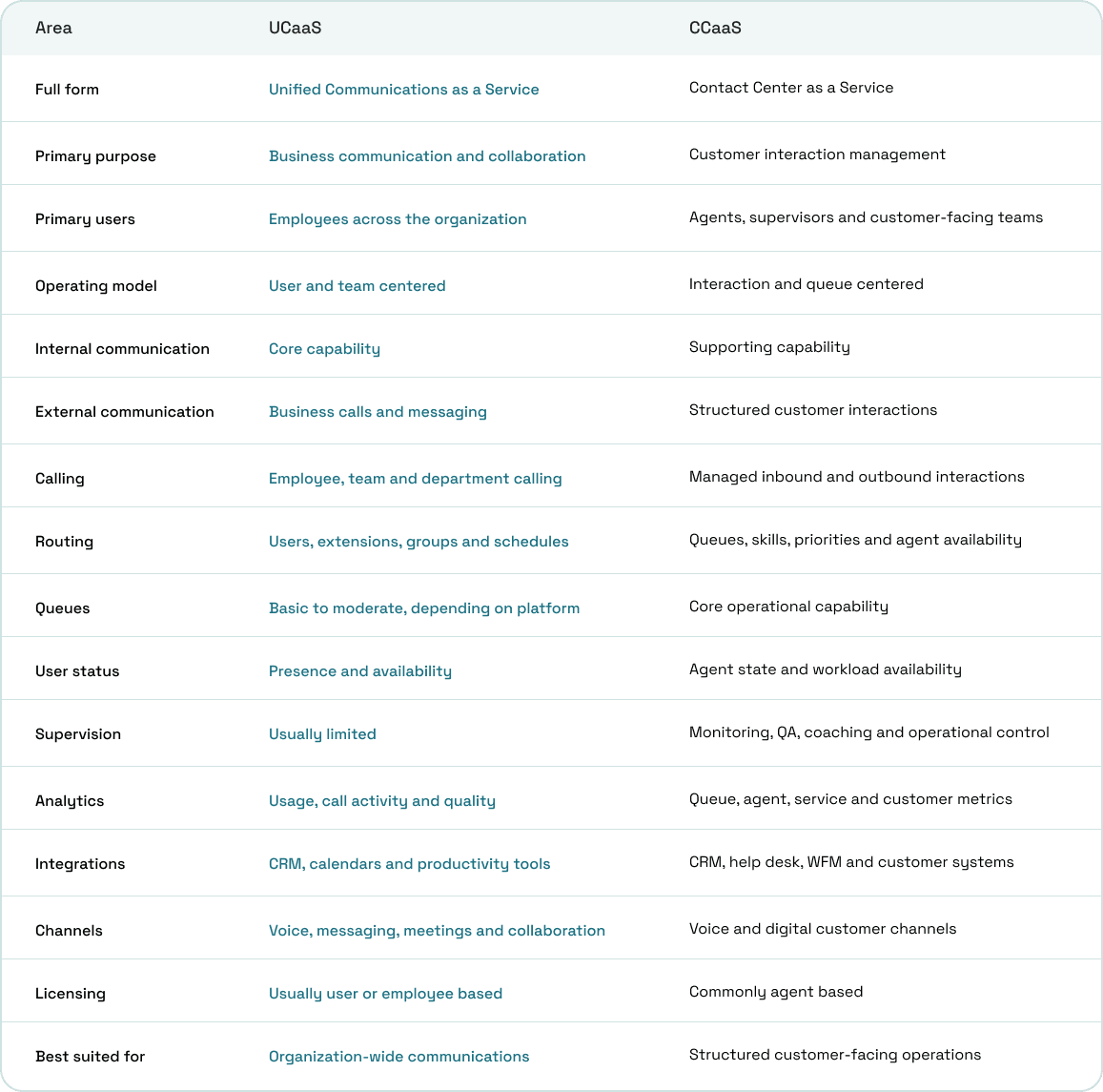
UCaaS therefore organizes communications primarily around people and teams, while CCaaS organizes customer interactions around operational processes. That distinction remains useful even when both products offer similar calling features.
What Is the Difference Between UCaaS and CCaaS?
The main difference between UCaaS and CCaaS is the workflow each system is designed to manage. UCaaS is primarily user-centered, while CCaaS is primarily interaction-centered.
A UCaaS platform generally needs to know who an employee is, how they can be reached and which communication tools they use. Their extension, number, presence, voicemail and devices follow that identity.
CCaaS needs another operational layer because customer interactions must be distributed across available resources. Queues, skills, priorities, agent states and service rules can influence who receives each interaction.
Consider a normal business call through UCaaS:
Customer → business number → auto-attendant → department or ring group → employee → conversation
The objective is mainly to connect the caller with the appropriate person or team. Transfers, forwarding, business hours and voicemail can handle what happens when that person is unavailable.
A CCaaS interaction can follow a more structured path:
Customer → number → IVR → intent → queue → routing rules → eligible agent → interaction → disposition → reporting
The platform can also retrieve customer context, monitor waiting time and preserve information after the conversation finishes. That operational layer is where CCaaS begins separating itself from ordinary business communications.
The Same Features Do Different Jobs in UCaaS and CCaaS
Looking only at vendor feature lists can make UCaaS and CCaaS appear almost identical. Calling, IVR, queues, recording, routing, CRM integrations and analytics can exist in both categories.
The better question is how each capability is being used.
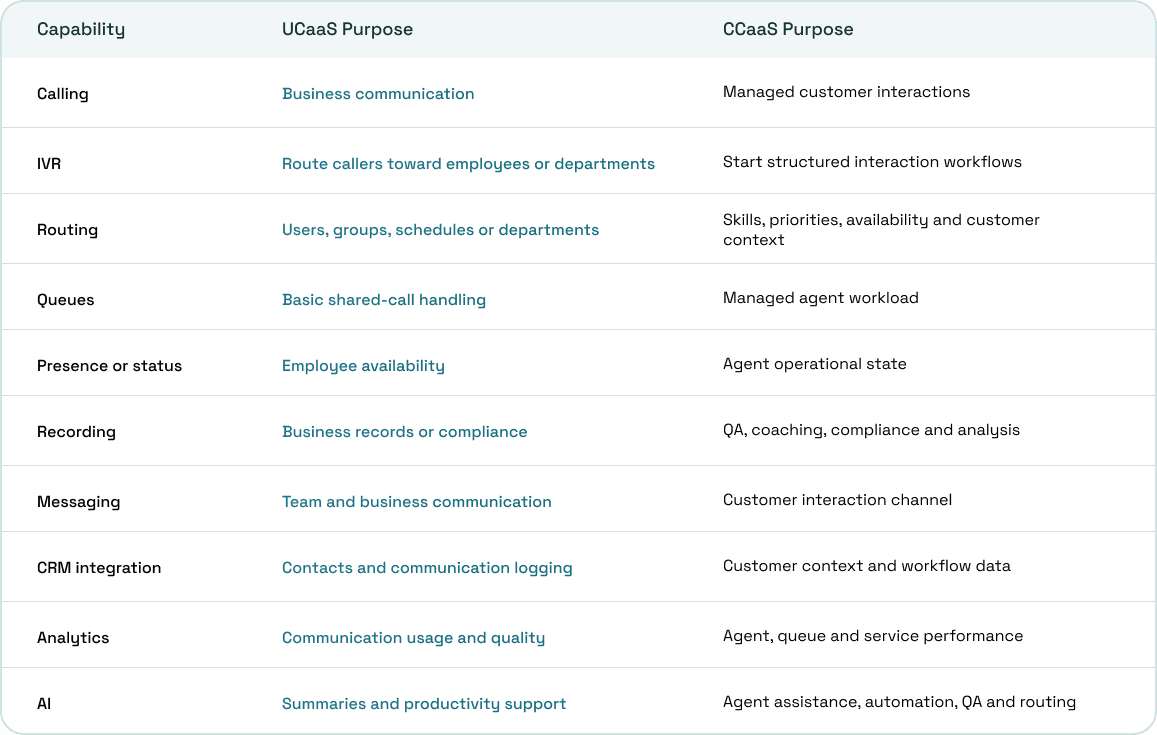
This is why a platform offering call queues does not automatically qualify as a complete CCaaS product. Modern communication platforms increasingly borrow features from adjacent categories.
UCaaS Routing vs CCaaS Routing
Routing exposes the difference particularly well because almost every business phone and contact center platform advertises it. What happens behind the word “routing” can be substantially different.
UCaaS routing can commonly use:
- Extensions
- Individual users
- Departments
- Ring groups
- Auto-attendants
- Business hours
- Call forwarding
- Simultaneous ringing
- Basic queues
- Overflow destinations
The objective remains straightforward: determine which employee, group or destination should receive the call. These capabilities can support sophisticated business phone workflows without creating a full contact center.
CCaaS routing can account for:
- Queue membership
- Agent availability
- Agent skills
- Customer priority
- Language
- Customer attributes
- Waiting time
- Current workload
- Escalation rules
- Advanced overflow logic
- CRM context
Automatic call distribution can therefore decide which eligible agent should receive a particular interaction at a particular moment. The platform is managing workload rather than simply choosing which telephone should ring.
Employees and Agents Are Managed Differently in CCaaS & UCaaS
A UCaaS user generally needs a communication identity covering their number, extension, presence, voicemail, messages, contacts and devices. Those capabilities help the employee communicate wherever their work happens.
A contact center agent needs additional information because their availability affects customer workload and queue performance. Their status becomes an operational input rather than only an indication of whether they are online.
Agent-specific information can include:
- Assigned queues
- Skills
- Availability state
- Active interaction status
- After-call work
- Dispositions
- Workload
- Performance metrics
- Supervisor visibility
An employee can therefore speak with customers every day without functioning as a formal contact center agent. The distinction appears when those interactions become structured, distributed and measured work.
When Is UCaaS Enough for Customer Communication?
Customer calls alone do not justify buying a separate contact center platform. Many small and mid-sized customer-facing workflows fit comfortably inside a capable UCaaS or business phone system.
UCaaS may remain enough when:
- A limited number of employees answer customer calls
- Most callers simply need the correct person or department
- Ring groups handle distribution effectively
- Routing rules remain straightforward
- Basic call queues are sufficient
- Customer communication is mainly voice-based
- Dedicated contact center supervisors are unnecessary
- Formal service-level targets are unnecessary
- Workforce forecasting is unnecessary
- Customer volume remains manageable
A property office, clinic, professional services company or growing sales team can handle substantial customer communication without operating a formal contact center. Complexity matters more than whether customers are involved.
When Does a Business Need CCaaS?
CCaaS becomes more relevant when customer communication starts behaving like an operational workload rather than a collection of individual calls. Dedicated agents and structured queues usually mark that transition.
Common signs include:
- Customers regularly wait in queues
- Dedicated agents handle most interactions
- Several queues need different rules
- Agent skills affect routing
- High-value customers receive priority
- Supervisors need live queue visibility
- Wait times and abandoned interactions matter
- Service levels need measurement
- Calls require formal quality review
- Agents complete dispositions after interactions
- Staffing depends on interaction volume
- Multiple customer channels need coordination
- Performance needs to be measured by agent or team
The deciding point is not whether the company has fifty employees or five thousand. A smaller operation can need CCaaS when its interaction volume and routing requirements become sufficiently structured.
Four Levels Between Business Calling and a Full Contact Center
The UCaaS vs CCaaS decision is easier when communication requirements are treated as a progression instead of two rigid boxes. Businesses can sit anywhere between basic calling and an advanced contact center.
Level 1: Business Calling
The organization needs business numbers, extensions, voicemail, transfers and reliable calling across office, browser or mobile devices. A business phone system or UCaaS platform usually covers these requirements.
Level 2: Shared Customer Calling
Customers reach a central number before being directed to departments, ring groups or simple queues. UCaaS can often remain sufficient when routing and reporting requirements are still manageable.
Level 3: Managed Call Center
Dedicated agents handle customer workloads through multiple queues, routing rules, recordings, dispositions and supervisor oversight. These requirements begin moving the operation firmly into CCaaS territory.
Level 4: Omnichannel Contact Center
Customer conversations span voice and digital channels while preserving context across the journey. Advanced CCaaS can add workforce management, quality management, automation, agent assistance and journey analytics.
UCaaS and CCaaS Measure Different Things
The metrics emphasized by each platform provide another clue about its underlying purpose. UCaaS reporting generally concentrates on communication activity, adoption, reliability and call performance.
UCaaS metrics can include:
- Call volume
- Call duration
- Call quality
- Service availability
- User activity
- Platform adoption
- Meeting usage
- Device performance
CCaaS reporting is designed around the performance of customer-facing operations. Managers need visibility into queues, agents, service levels and the outcomes produced by customer interactions.
Common CCaaS metrics include:
- Interactions offered
- Interactions answered
- Average speed of answer
- Queue wait time
- Abandonment rate
- Average handle time
- First-contact resolution
- Service-level attainment
- Agent occupancy
- Disposition outcomes
- Customer satisfaction
- Agent performance
The distinction is useful because UCaaS measures how communication is functioning, while CCaaS measures how a customer interaction operation is performing. Both can report calls without answering the same management questions.
UCaaS and CCaaS Integrations Also Serve Different Workflows
Both categories commonly integrate with CRM platforms, which makes integration lists another unreliable way to distinguish them. The depth and purpose of those integrations usually provide more useful information.
UCaaS commonly connects with:
- CRM platforms
- Calendars
- Productivity suites
- Collaboration tools
- General business applications
These integrations can simplify dialing, synchronize contacts, record communication activity or connect meetings and schedules. They primarily support employees as they communicate through their normal business workflows.
CCaaS integrations commonly extend further into:
- Help desk platforms
- Ticketing systems
- Customer databases
- Knowledge bases
- Workforce management
- Quality management
- Customer-data platforms
An agent may need customer history displayed before answering and interaction outcomes written back when the conversation ends. That depth connects communications directly with service operations.
UCaaS vs CCaaS Cost
UCaaS is usually priced per user, while CCaaS pricing is more often tied to agents, feature tiers, channels and operational capabilities. That makes CCaaS pricing harder to compare using a simple per-seat figure.
UCaaS costs can include user licenses, numbers, calling plans, hardware, recording and premium integrations. CCaaS can add agent licenses, supervisor access, advanced analytics, recording, QA, workforce management and digital channels.
The lowest advertised price is often not the price of the configuration you actually need.
When comparing costs, check:
- Per-user vs per-agent pricing
- Named vs concurrent agents
- Calling and number charges
- Recording and storage
- WFM and QA add-ons
- AI and automation charges
- CRM or help desk integrations
- Onboarding and implementation
The useful comparison is not the cheapest advertised seat. It is the total cost of supporting the communication workflow your business actually needs.
Multichannel Does Not Automatically Mean Omnichannel
CCaaS providers frequently describe their platforms as multichannel or omnichannel, although those terms should not be treated as interchangeable. Multichannel means customers can communicate through several available channels.
Omnichannel goes further by maintaining customer context and continuity when interactions move between supported channels. Offering voice, SMS, email and chat separately does not automatically create an omnichannel contact center.
How AI Is Changing UCaaS and CCaaS
AI is expanding across both UCaaS and CCaaS, although the underlying jobs remain different. UCaaS applications generally concentrate on improving employee communication, search, documentation and productivity.
Those capabilities can include transcription, meeting summaries, automated notes, action items, conversation intelligence and searchable communication history. They reduce administrative work surrounding ordinary employee conversations.
CCaaS is increasingly applying AI directly to customer interaction workflows through virtual agents, intelligent handoffs, agent assistance, automated quality management and interaction analysis. RingCentral, for example, expanded AIR Pro into RingCX workflows in June 2026 with automated outreach and intelligent handoffs.
Customer behavior is also changing faster than traditional chatbot strategies assumed. A 2026 Gartner survey found customers were roughly three times more likely to use third-party generative AI than company-provided chatbots for service issues.
Human escalation still matters within that shift because customers expect access to a person when automation cannot resolve their problem. That makes context preservation between automated and human interactions particularly important.
Deloitte's 2026 contact center research also found integration of technologies, systems and tools was the most commonly cited challenge among lagging contact centers, at 72%. Legacy systems followed at 58%, highlighting why architecture matters alongside new features.
Do You Need UCaaS, CCaaS or Both?
The choice becomes clearer once the business requirement is mapped against communication complexity. Many organizations start with UCaaS before adding CCaaS as customer-facing operations become more structured.
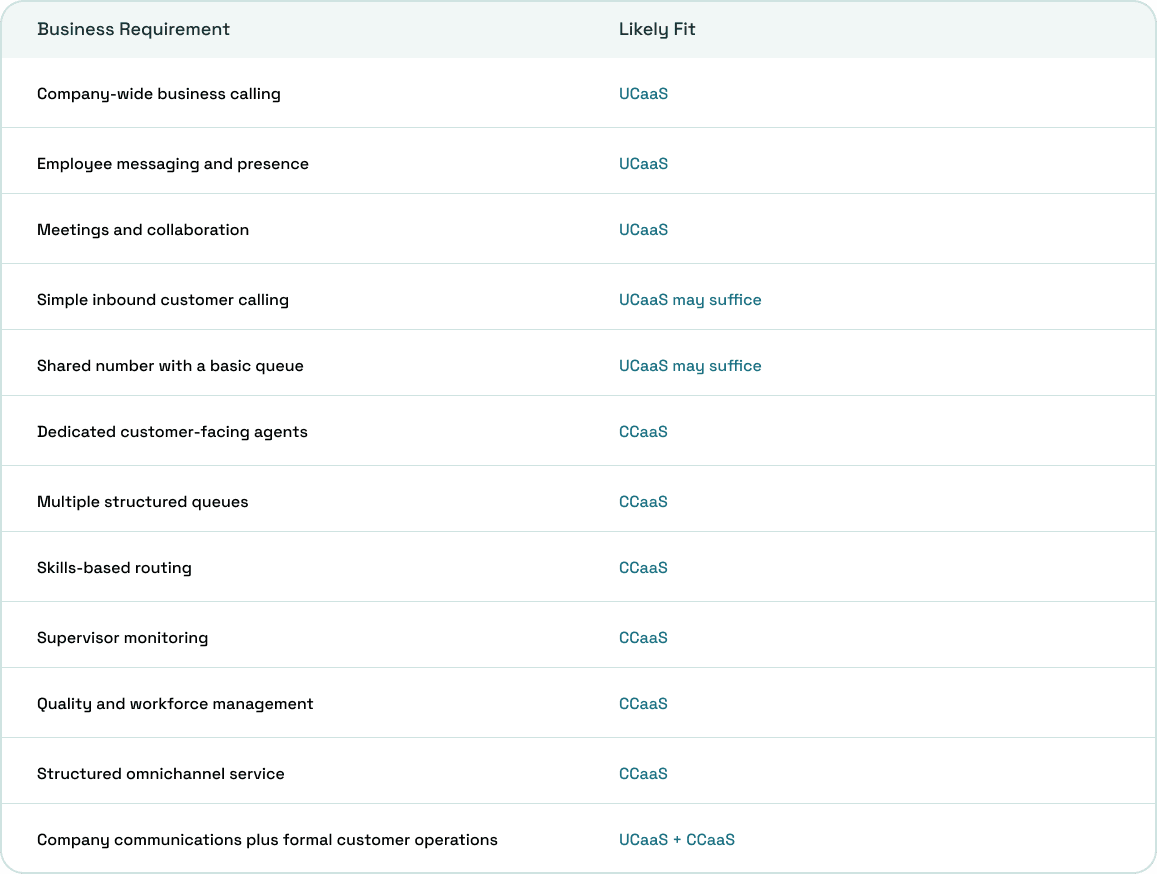
Using both does not mean every employee requires contact center capabilities. UCaaS can serve the organization broadly while CCaaS licenses and workflows remain concentrated around relevant customer-facing teams.
How UCaaS and CCaaS Work Together
Consider a contact center agent handling an account problem that requires expertise from someone in finance. The customer interaction remains inside CCaaS while the agent searches the wider organization for help.
Connected UCaaS presence can show whether the finance specialist is available before the agent calls or messages them. The specialist can contribute without becoming a permanent member of the contact center.
The flow can look like this:
Customer → CCaaS agent → specialist required → UCaaS presence checked → specialist consulted → customer conversation continues → interaction outcome recorded
This relationship explains why UCaaS and CCaaS increasingly appear within connected product portfolios. Customer-facing teams rarely operate independently from sales, finance, operations, technical specialists and management.
Unified UCaaS and CCaaS or Separate Platforms?
Organizations can buy UCaaS and CCaaS separately, particularly when specialist requirements justify choosing best-of-breed vendors. A sophisticated contact center should not sacrifice operational depth merely to reduce vendor count.
Separate platforms can provide:
- Greater specialist feature depth
- Independent vendor selection
- Flexibility for complex environments
- Freedom to replace individual components
They can also introduce additional integration, identity, administration, support and data synchronization requirements. Those costs should be evaluated alongside subscription pricing rather than treated as implementation details.
A unified UCaaS and CCaaS environment can provide:
- Shared directories
- Connected presence
- Easier employee consultation
- Consolidated administration
- Fewer integration layers
- More consistent communication workflows
The unified model still needs scrutiny because a broad communications platform may not match specialist CCaaS functionality in every area. Requirements around WFM, QA, routing and channels should be validated individually.
What to Check Before Choosing UCaaS or CCaaS
Feature checklists become less useful once several competing products support calling, routing, recording and integrations. The better procurement questions describe how communication actually moves through the organization.
Ask:
- Are customers trying to reach employees or entering managed queues?
- How many queues does the operation require?
- What determines which person receives an interaction?
- Do different agents require different skills?
- Are customer priorities used during routing?
- Do supervisors need live queue visibility?
- Are formal service levels measured?
- Is call monitoring or quality management required?
- Does staffing depend on interaction forecasts?
- Which customer communication channels matter?
- Should context follow customers between channels?
- What should agents see before answering?
- What information must return to the CRM afterward?
- How does agent licensing work?
- How are recordings and storage charged?
- Which reports are included without add-ons?
- What happens when queues overflow?
- How are after-hours interactions handled?
- Can agents easily reach employees outside the contact center?
- Are UCaaS and CCaaS genuinely unified or connected through separate integrations?
Answering those questions usually reveals the correct category before a vendor demonstration begins. They also make pricing comparisons considerably more useful because the required workflow is already understood.
CCaaS Vs. UCaaS: Where ArcSIP Fits
ArcSIP is designed across both sides of this comparison, combining broader business communications with more structured customer-facing calling. That means businesses do not necessarily need to treat UCaaS and CCaaS as completely separate environments.
ArcSIP reduces the separation between employee communications and customer-facing calling.
ArcSIP brings together:
- Business Phone System: calling, numbers, extensions, IVR, routing, transfers and voicemail
- Contact Center: queues, live call visibility, call history, call journey and operational reporting
- Remote Teams: browser-based calling, mobile access and communication across distributed teams
The advantage is not simply having more features in one place. It is reducing the gap between employees handling everyday business communication and teams managing customer interactions.
Conclusion
UCaaS and CCaaS overlap more than their labels suggest, but they solve different operational problems. UCaaS helps the wider business communicate, while CCaaS adds the structure needed to manage customer interactions as measurable workflows.
The practical decision comes down to three questions:
- Do employees mainly need reliable business communication across teams and devices?
- Are customer interactions entering queues with routing, supervision and service-level requirements?
- Do both groups need to work closely enough that separate systems create unnecessary friction?
If you are comparing vendors, I suggest you stop counting features and map one real customer interaction from start to finish. The gaps in routing, supervision, integrations and internal collaboration usually become obvious immediately.
ArcSIP is built around that overlap, bringing business communications and more structured customer-facing workflows into one environment. For teams comparing UCaaS and CCaaS today, that connected approach is worth evaluating alongside standalone platforms.