



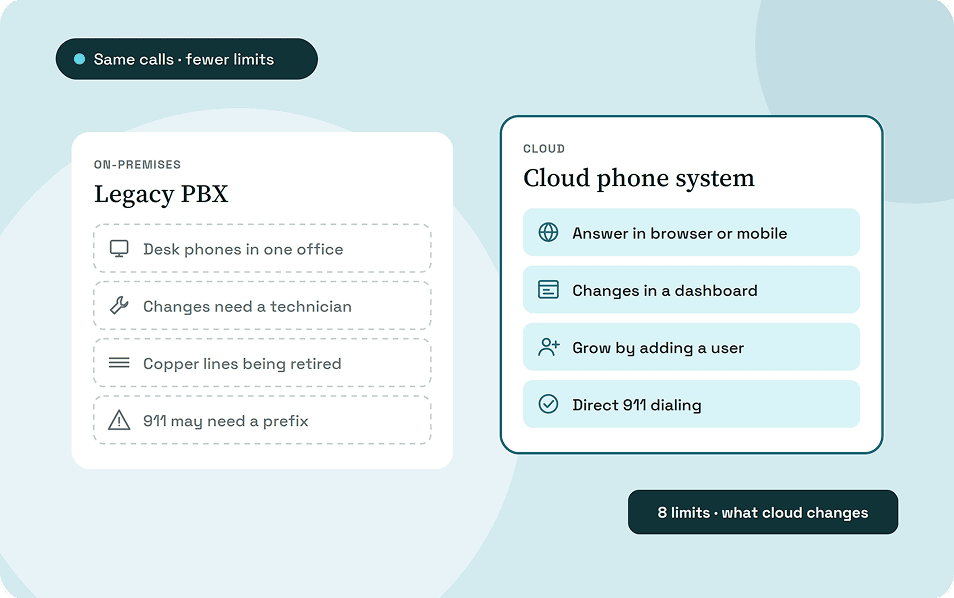
A legacy phone system ties calls to desk phones in one building, makes every change depend on the PBX or a technician, and grows only when you buy more hardware. Its features stop at what you paid for, and the copper lines and 911 rules around it are changing.
This guide explains each limitation and what changes when you move to a cloud phone system. It also covers what cloud doesn't fix, and how to decide whether to keep, extend, or replace the system you have.
Key takeaways
- Legacy systems tie calls to desk phones in one building, so remote staff can't answer the main number without workarounds.
- Routine changes and growth depend on the PBX, extra hardware or a maintenance vendor.
- Under a 2026 FCC order, carriers can discontinue legacy voice service with a 31-day automatic approval.
- PBXs installed before February 16, 2020 aren't covered by Kari's Law and may still need a prefix before 911.
- A cloud system removes the hardware limits but depends on your internet connection and power.
What counts as a legacy phone system?
A legacy phone system is an on-premises PBX or key system in your building, connected to the phone network over copper or PRI lines. You own the hardware, and you or a vendor maintain it.
An IP-PBX on your own server still counts, because it sits in your building and you maintain it. Our guide on what a business phone system is covers all the types in more detail.
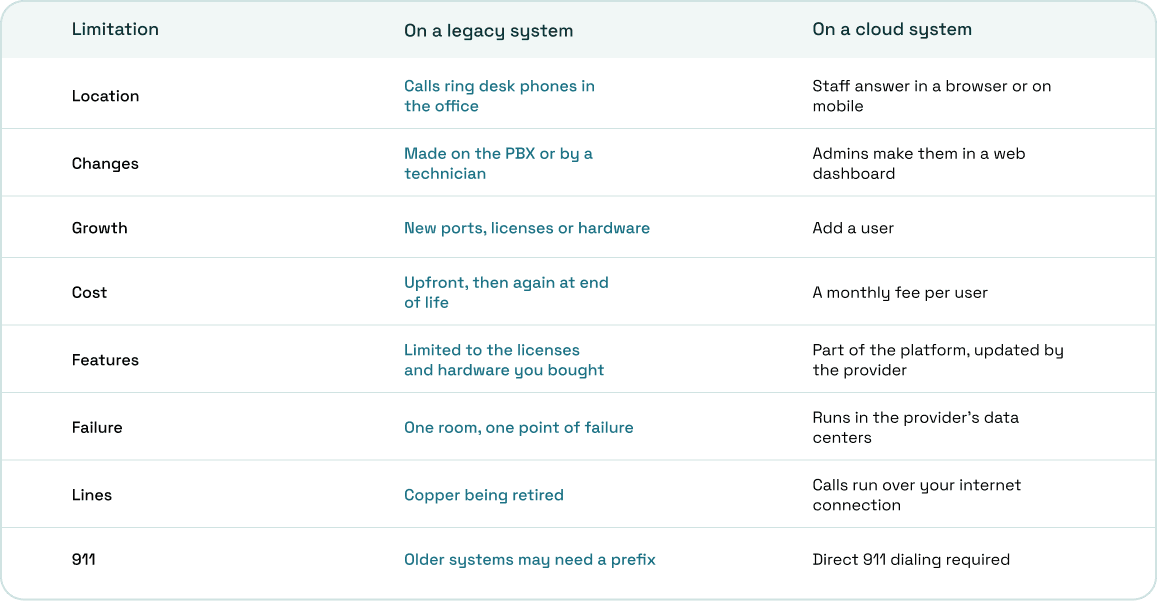
Legacy vs cloud phone systems at a glance
This table sums up the eight limitations and what changes in the cloud. Each row is explained in its own section below.
Where legacy phone systems fall short
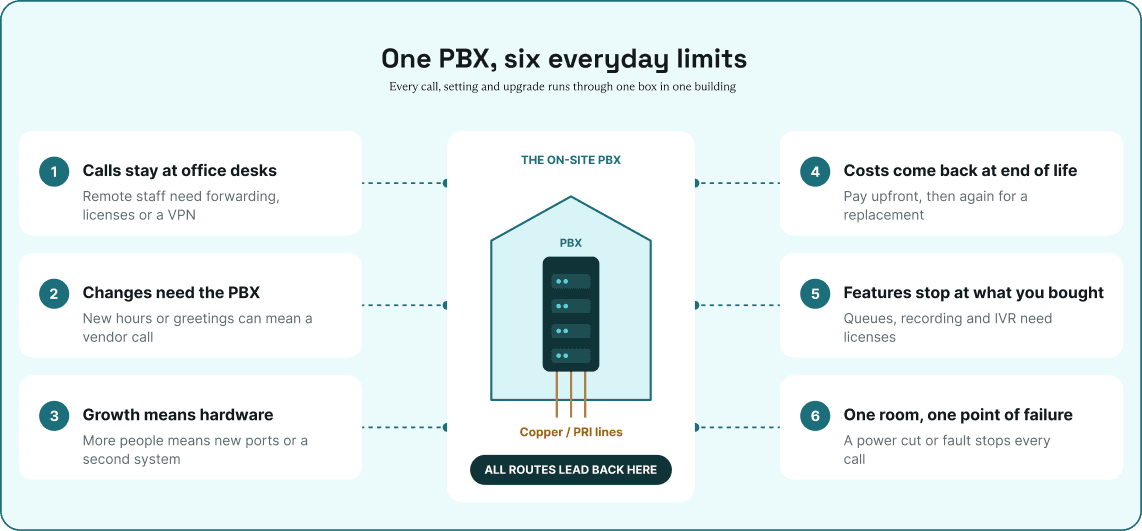
Each limitation below shows up in day-to-day work, not just on an IT checklist. For each one, you'll see what it looks like on a legacy system and what changes in the cloud.
1. Calls are tied to the office
Extensions on a legacy PBX live on desk phones connected to the office network. Staff working from home or on the road can't answer the main number unless you forward calls to their personal mobiles or add remote licenses and a VPN.
In the cloud, staff answer the same business number in a browser or on a mobile app wherever they have internet. Calls follow the person, not the desk.
2. Every change needs the PBX or a technician
Adding a new hire, changing business hours, recording a new greeting or moving someone to another desk means logging into the PBX console. If nobody in-house knows the system, each change becomes a call to the maintenance vendor.
On a cloud system, admins make the same changes in a web dashboard. New hours, greetings and call flows apply as soon as they're saved.
3. Growth means buying hardware
A PBX has a fixed number of ports, licenses and line cards. Adding people beyond that limit, or opening a second office, means new hardware, new lines or a second system to manage.
In the cloud, adding a person means adding a user. The provider handles the capacity behind it, so growth doesn't depend on what's installed in your building.
4. Costs come upfront, then again at end of life
You pay for the PBX, the phones and the installation upfront, then for maintenance every year. When the vendor stops supporting your model or parts become hard to find, you pay again for a replacement.
A cloud system replaces that cycle with a monthly fee per user. The provider maintains and updates the platform, so there's no hardware refresh on your side.
5. Features and reporting stop at what you bought
On a legacy PBX, features like call queues, call recording, multi-level IVR menus and voicemail to email depend on the licenses and hardware you purchased. If your model doesn't support one, adding it means an upgrade or a separate product.
Reporting has the same limit, since you get call logs but little live view of who's waiting or how long. In the cloud, these features are part of the platform and update without new hardware.
6. One building is a single point of failure
The PBX sits in one room, so a power cut, flood or hardware fault there takes the phones down. Calls stop until someone fixes or replaces the equipment.
A cloud system runs in the provider's data centers, so an outage at your office doesn't take the system down. Calls still follow your call flow, and staff can answer on mobile or from home.
7. Older systems may not meet today's 911 rules
Kari's Law requires business phone systems to allow direct 911 dialing with no prefix and to alert someone on site when a call is made. It only covers systems manufactured, sold or installed after February 16, 2020, so an older PBX may still need "9" before 911, which is the problem the law was written to fix.
Any system installed after that date, cloud systems included, must support direct 911 dialing. RAY BAUM'S Act also requires 911 calls to carry a dispatchable location, such as a street address with a floor or room.
What a cloud phone system doesn't fix
A cloud system removes the hardware limits but brings dependencies of its own. Plan for these before you switch.
- Internet dependence. If the office connection drops, desk phones and browsers there stop working. Plan a backup connection or have staff answer on mobile.
- Power. The FCC notes that VoIP may not work during a power outage, and your routers and switches need backup power too.
- Network quality. A G.711 call uses about 87.2 kbps over Ethernet, so check your bandwidth and set your router to prioritize voice.
- Emergency addresses. Remote staff need a registered address so 911 calls carry the right location.
- Analog devices. Fax machines, alarm panels and elevator phones may not work as they are, and the FCC requirement that replacement services stay compatible with them ended in 2025.
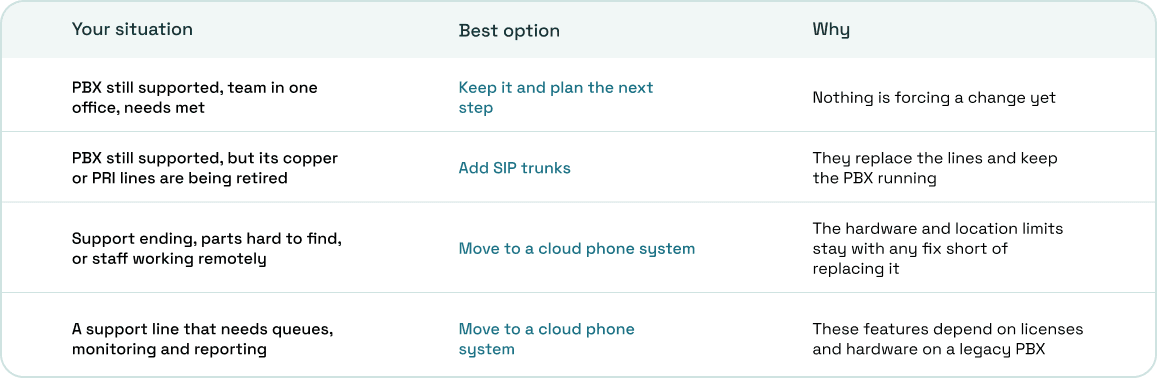
Keep it, add SIP trunks, or move to the cloud?
Not every legacy system needs replacing straight away. The right move depends on how old the system is and what your team needs from it.
How ArcSIP handles these limits
ArcSIP is a cloud business phone system with contact center tools in the same plan. Here's how it maps to the limitations above.
Staff make and take calls in a browser or on the iOS and Android apps. Admins set up ring to agent, ring to team, multi-level IVR menus, business hours and special dates in the dashboard, without a technician.
The same platform runs teams from 3 to 5,000 users, with no limit on how many calls run at once. Call queues, SLA targets, a live dashboard, live call monitoring, call recording and Call Journey, which traces each step a call takes, are all included.
ArcSIP Unlimited costs $29 per user per month, with a three-user minimum. You can start a 7-day trial with no credit card.
Know what your current system is costing you
The limits of a legacy phone system are easiest to see in what your team works around every day. List the workarounds, such as forwarding calls to personal mobiles or waiting on the vendor for a simple change.
If several of the limitations above apply, our guide on how to migrate from a legacy PBX to a cloud phone system covers the move step by step.