



To choose a business phone system, start with features, then check three things about your own business: who answers calls, how many calls arrive in your busiest hour, and what happens to each call after it's answered.
A small team sharing one number needs ring groups and voicemail. Growing departments need an IVR and team routing, and any dedicated support or sales line needs queues and live monitoring.
Pick the provider whose plan covers all of this now and as your team grows.
Key takeaways
- Start with the baseline features: call routing, multi-level IVR, call forwarding, warm and blind transfer, call park, conferencing, voicemail to email, call recording, call logs, business hours and browser or mobile calling.
- Then audit your team by phone role, your busy-hour call volume and ten real calls.
- Judge every provider on reliability, number coverage, ease of use, total cost, room to grow, reporting, security, integrations, support and a trial of your own workflows.
- Pick the plan that covers your requirements today and at your next team-size band, without a tier upgrade or a second product.
What features should you look for in a Business Phone System?
The baseline to expect from any provider:
- Call handling: call routing, multi-level IVR, call forwarding, warm and blind transfer, call park, and conference calling
- Records: voicemail to email, call recording and call logs
- Caller experience: music on hold, plus business hours and holiday rules
- Remote work: browser and mobile calling on the business number
Judge these against how your team will actually use them, not against whoever has the longest list. A feature nobody on your team touches is just another line on the invoice.
The trouble is that almost every provider lists the same things. The real differences sit in packaging (which tier a feature lives in, or whether contact center tools are a separate product) and in how the system copes with your team, your call load, and the way you handle calls.
A feature grid can't tell you any of that. Three audits of your own business can.
Audit your team by phone role, not headcount
Headcount tells you how many seats to buy. It doesn't tell you what kind of system those seats need, because twenty employees might mean three people answering customer calls and seventeen who only need a direct line.
Sort everyone by what they actually do on the phone:
- Answer calls for the business, such as front desk, inbound support or inbound sales
- Mostly make calls, like outbound sales or follow-ups
- Need a direct number and take the odd call
- Watch and manage other people's calls
Then note where each group works. Because anyone away from an office desk will need browser or mobile calling.
Finally, look 12 to 24 months ahead. Even if a provider offers more seats, the real question is whether your team will need a different kind of system at that size.
Here's how calls usually change as a team grows:
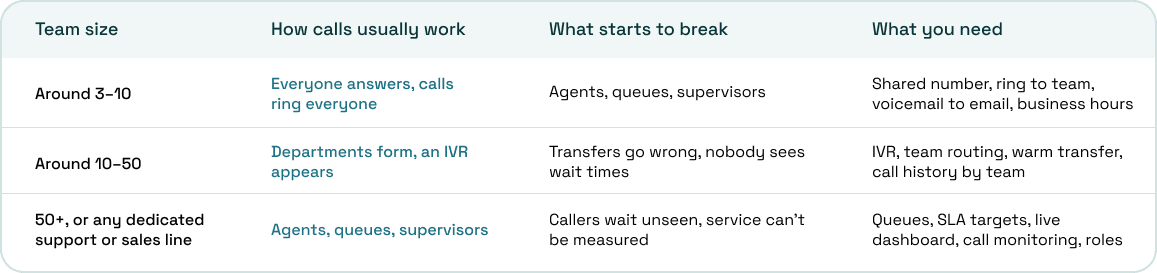
The trouble with most providers is that you might need different subscription tiers to unlock the features you need. Which makes the choice difficult. But ArcSIP now offers all of the features you expect from a business phone system along with a contact center and remote communication in one single subscription.
Audit your call volume in numbers you can use
Pull 30 to 90 days of call logs from your current provider, or tally calls by hour for two weeks if there's no export. From that data, you want:
- Your inbound vs outbound split
- Calls in your busiest hour, and which hour and day that is
- Average call length
- Missed and abandoned calls, and when they happen
- After-hours calls
- The most calls running at the same time
How many lines you need
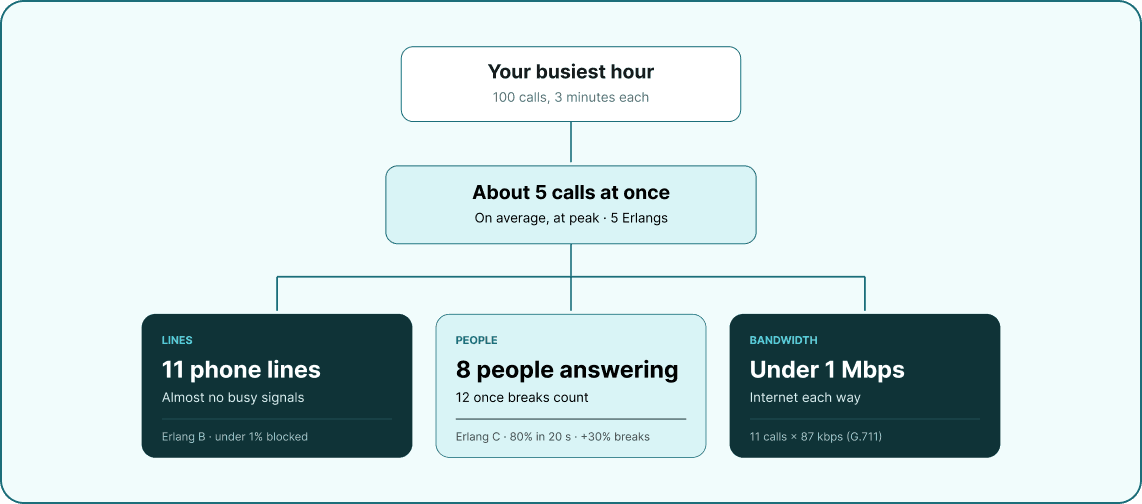
Multiply your busiest-hour calls by the average call length in seconds, then divide by 3,600. The result is traffic in Erlangs, the unit telecom engineers use to measure call load.
Take 100 calls in the busy hour at 3 minutes each: 100 × 180 ÷ 3,600 = 5 Erlangs. Run that through the Erlang B formula and you need 11 lines to keep blocked calls under 1%, a number that matters if a provider charges per line or caps how many calls run at once.
How many people need to answer
Lines and people aren't the same number. A support line taking 200 calls an hour at 3 minutes each carries 10 Erlangs, and the Erlang C formula says 14 agents will answer 80% of those calls within 20 seconds.
Add 30% shrinkage for breaks, leave, and training, and it puts the roster at 20 people. No phone system fixes understaffing, but a good one shows you when it's happening.
How much bandwidth you need
A standard G.711 call uses about 87 kbps in each direction over Ethernet, and a compressed G.729 call uses about 31 kbps. Multiply by your peak simultaneous calls and leave plenty of headroom for everything else on the network.
Stability matters more than speed, though. Jitter and packet loss will ruin call audio long before a decent connection runs out of bandwidth.
Audit your workflows by tracing real calls
Take ten recent calls of different kinds: a sales enquiry, a support issue, a caller who reached the wrong department, an after-hours call and a callback. For each one, write down where it landed first, every handoff, where it waited, how it ended, and where the notes went.
You're looking for leaks. Voicemails nobody checks, transfers that drop the caller, customers repeating their story and follow-ups that live only in someone's head each point to a feature you need.
Most traced calls fit one of a few patterns, and each pattern asks something specific of the system:
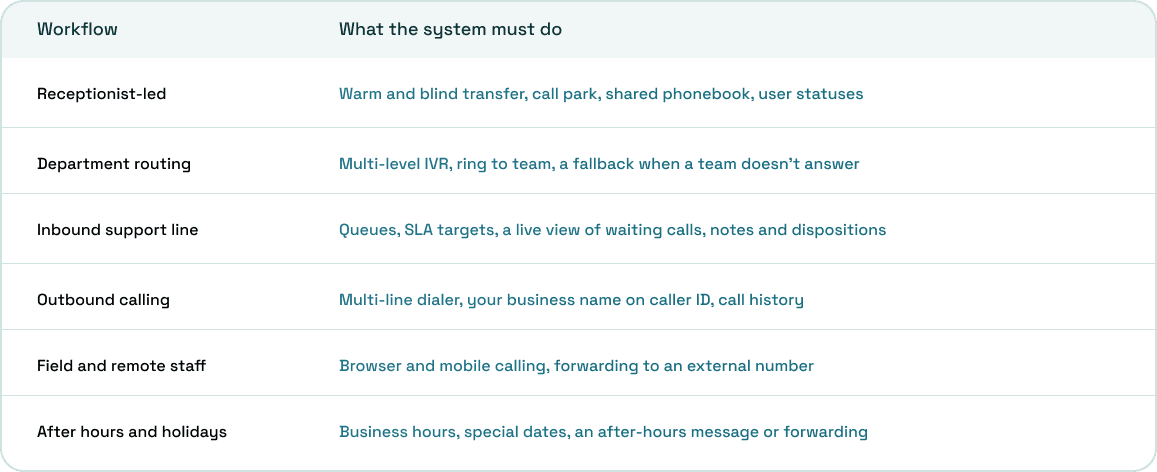
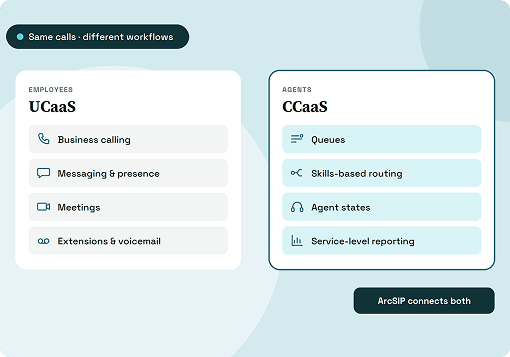
Most businesses run two or three of these at once. A clinic might have a receptionist up front, a billing line with a queue, and after-hours forwarding to an on-call doctor, which is exactly the mixed setup that single-purpose systems struggle with.
While you trace, note where call notes and outcomes need to end up. If they belong in a CRM or helpdesk, ask every provider how that connection works.
Turn the audit into requirements and a system type
Put all three audits on one page. List your phone roles and how many people sit in each, your growth target, busy-hour calls, peak simultaneous calls, staff needed and bandwidth.
Add the workflows you traced, then sort every feature into must-have, nice-to-have, or don't need. That page, not a provider's feature grid, is what you take into every sales call.
It also points you to a type of system:
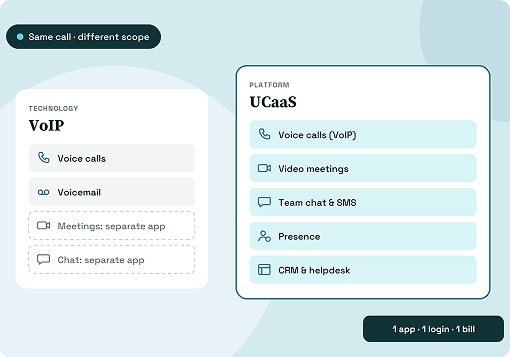
- Virtual phone system: a solo founder or tiny team with low call volume
- On-premises PBX: only where internet is unreliable or you need full on-site control
- Cloud business phone system: most teams in the first two rows of the team table
- Contact center platform: high-volume support or sales lines
- Unified phone and contact center platform: the mixed case most workflow audits turn up
Our guide on what a business phone system is covers each type in more detail.
Criteria to evaluate every provider on
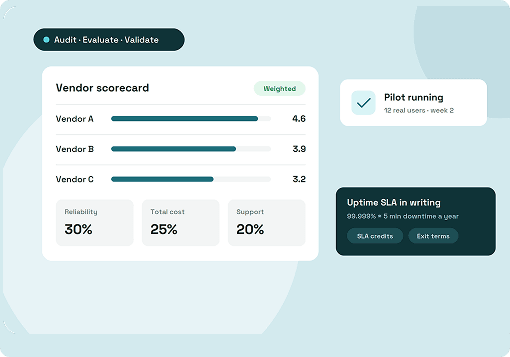
Once your requirements sheet is ready, score every shortlisted provider against the same criteria.
1. Reliability and call quality
Every other feature is worthless if calls drop or the audio breaks up. Ask for documented uptime commitments, how the network handles redundancy, and where incoming calls fail over during an outage. Some VoIP services stop working when the power goes out.
2. Coverage for your numbers and destinations
Check that the provider offers local and toll-free numbers in every country and area code you need, and can port the ones you already have. Then check which calling destinations the plan includes and what the rest cost. A gap here usually shows up the day you open in a new market.
3. Ease of use for agents and admins
A system your team finds awkward will get worked around, usually with personal mobiles. In the trial, watch how quickly someone can transfer a call, park it or look up a caller without help. Then have whoever manages the system change a call flow or business hours, and time it.
4. The cost of the plan you'll actually need
The entry price rarely matches the plan your audit points to. Queues, monitoring and reporting often sit in a higher tier or a separate product, while setup, usage fees, porting and international calls come on top. Read the contract for minimum commitments and early termination fees, then price your requirements sheet on each plan.
5. Room to grow
Your team audit shows where you'll be in two years, and the provider should get you there without a migration. Ask whether adding users, numbers or a new team means a new tier, a new product or a new system. Each switch costs time and can cost you your call history.
6. Reporting and call visibility
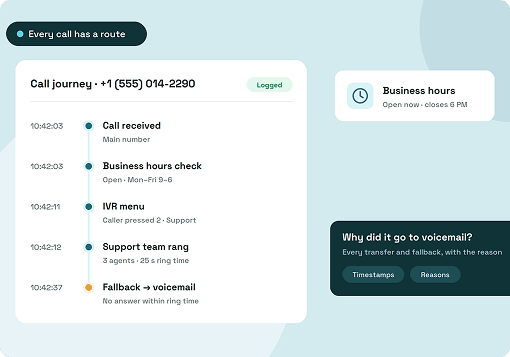
Your volume audit only helps if you can keep measuring after the switch. Look for live views of waiting and missed calls, plus summaries by number, team and user. When one customer complains, you should be able to trace that single call from start to finish.
7. Security and access control
Not everyone on your team should see or change everything. Check how roles and permissions work, whether calls and recordings are encrypted, and how the provider guards against toll fraud on international calls. Ask how it handles recording consent as well, such as a notice that plays before a recorded call connects.
8. Integrations with your existing tools
Your workflow audit shows where call notes and outcomes need to land. If that's a CRM, helpdesk or another everyday tool, ask whether the connection is built in, needs a third-party tool or doesn't exist yet. Typing notes into two systems is the kind of leak the audit was meant to catch.
9. Support and onboarding
Phone problems rarely wait for office hours. Check support hours and channels, how issues get escalated, what onboarding looks like for a team your size, and what reviews say about response times. A provider that helps you build your first call flows saves weeks of guesswork.
10. A trial that tests your own workflows
A demo shows the product at its best, while your own call flows show how it copes on a busy Tuesday afternoon. Rebuild three of your ten traced calls in the trial and send real calls through them before you pay. If something breaks there, you've found it before it costs you a customer.
Planning the switch
Most migration problems come from rushing the cutover. A little planning means your callers never notice anything changed.
- Port your existing numbers, with your Letter of Authorization and account details ready before you submit
- Schedule the cutover outside the busy hour you found in your volume audit
- Keep the old service running until the port completes, so no calls fall through in between
- Rebuild and test every call flow before go-live, including after-hours rules
- Train staff by role, then collect feedback after the first week
How ArcSIP fits what your audit finds
Plenty of audits land in the middle: too busy for a basic phone system, too mixed for a standalone contact center. ArcSIP puts the business phone system and the contact center tools in one platform, under one plan.
Team size
Teams anywhere between 3 and 5,000 users run on the same platform, with Owner, Admin, Supervisor and Agent roles. Crossing a team-size band doesn't mean changing systems.
Call volume
There's no line count to size, because every user gets a five-line dialer. Queues, SLA targets, and a live dashboard showing the longest wait, missed calls and dropped calls turn your volume audit into something you can watch every day.
Workflows
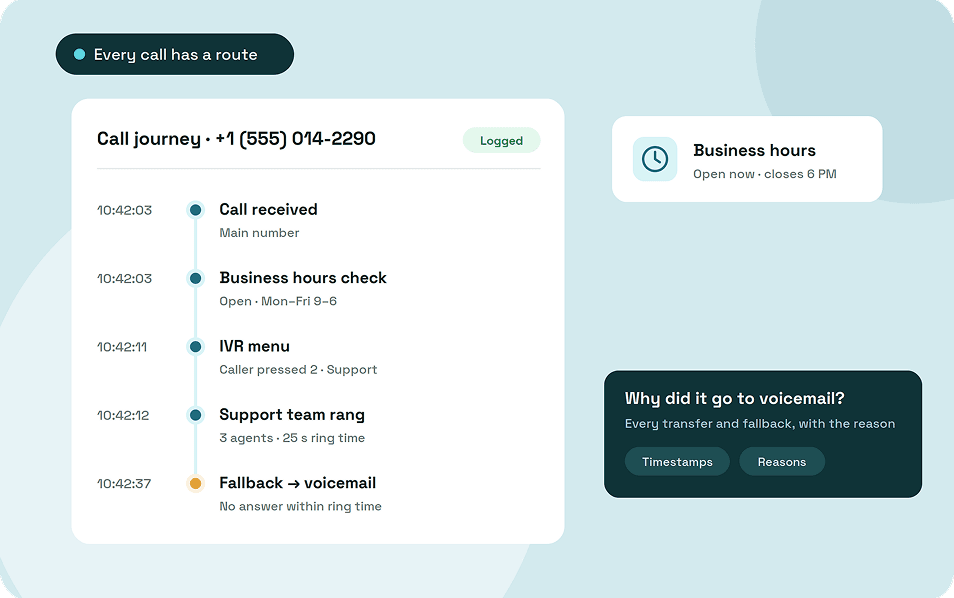
Ring to agent, ring to team, multi-level IVR, forward to number, business hours with special dates and after-hours fallbacks, warm and blind transfer, call park, notes and dispositions all come in the plan. Call Journey traces any single call step by step, the way you did by hand in your workflow audit.
ArcSIP Unlimited costs $29 per user per month, with a three-user minimum. You can start a 7-day trial without a credit card.
Choose the system you won't have to replace
A business phone system is easy to buy and painful to replace. Features get providers onto your shortlist, the three audits show which one fits, and the evaluation criteria show whether it'll keep fitting as you grow.
Do that work once and take your requirements sheet into every sales call. You'll be far less likely to go shopping again in two years.