



An IVR gets callers to the right team faster when you build it from the reasons people call, keep it to a few options on no more than two levels, and play the most common choice first. Every option then needs a team behind it, a backup for when that team is busy, and a way out for callers who don't fit any choice.
Key takeaways
- Design the menu from call reasons, not your org chart.
- Every second before a caller hears their option is a second they're not talking to anyone.
- Name options in the caller's words and keep keys consistent across levels.
- Give every option a team, a backup and a way out.
- Treat transfers after an answer as design bugs to fix.
How an IVR call works
An IVR is the automated menu behind "press 1 for sales." It answers the call, plays a set of choices and sends the caller wherever their key points.
IVR menus come in several types, from simple keypad menus to speech and AI systems. For getting callers to the right team, a keypad menu does the job without connecting your other systems to the phone line.
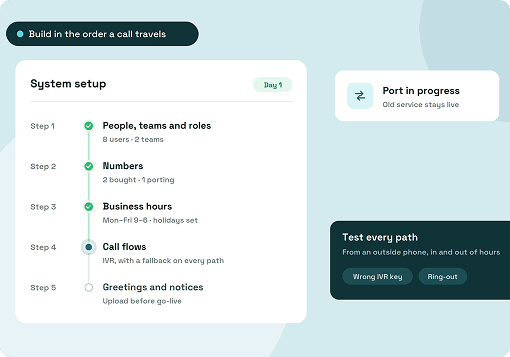
Every call then moves through the same five steps: a greeting, the menu, the caller's input, the action and a fallback when nobody answers. The fallback matters as much as the options, because it decides what happens to a caller whose team doesn't pick up.
When that team is busy, a call queue holds the caller in line until someone is free, and sends them to the fallback only once the wait runs past a set limit.
IVR design best practices
The practices fall into two groups: shaping the menu so callers hear their option sooner, and routing each option so the call lands with a team that can answer. Both groups start from the same routing map.
1. Build the menu around reasons people call
A menu organized by department makes callers guess which team owns their problem. A menu organized by call reason lets them pick the problem they actually have.
Start with a routing map. Pull a few weeks of call history, ask the people who answer what callers want, and match each reason to a team, as in this example for a property management company:
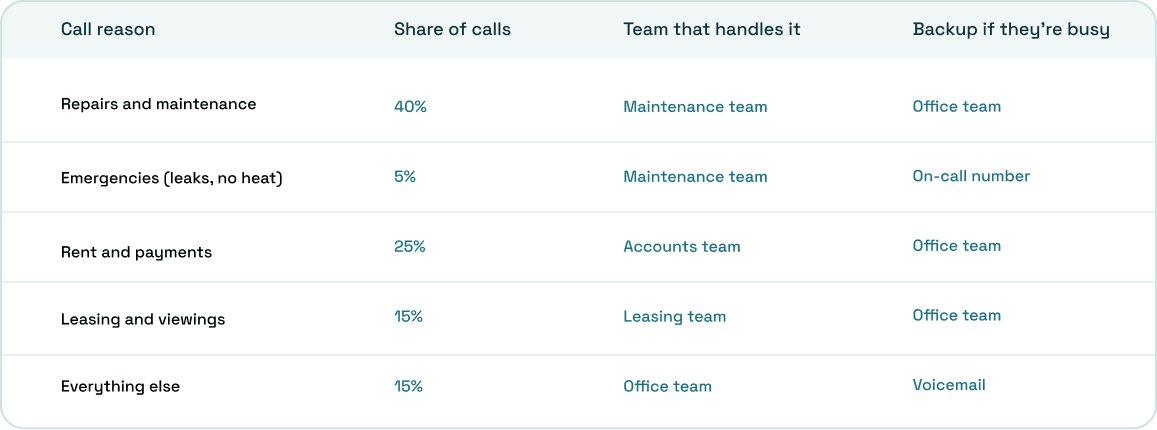
Reasons that go to the same team become one option. Here, repairs and emergencies both reach the maintenance team during the day, so they can share option 1.
2. Put the most common reason first
Callers listen to options in order, so the biggest group should hear theirs first. You can work out how long each caller waits before their option plays.
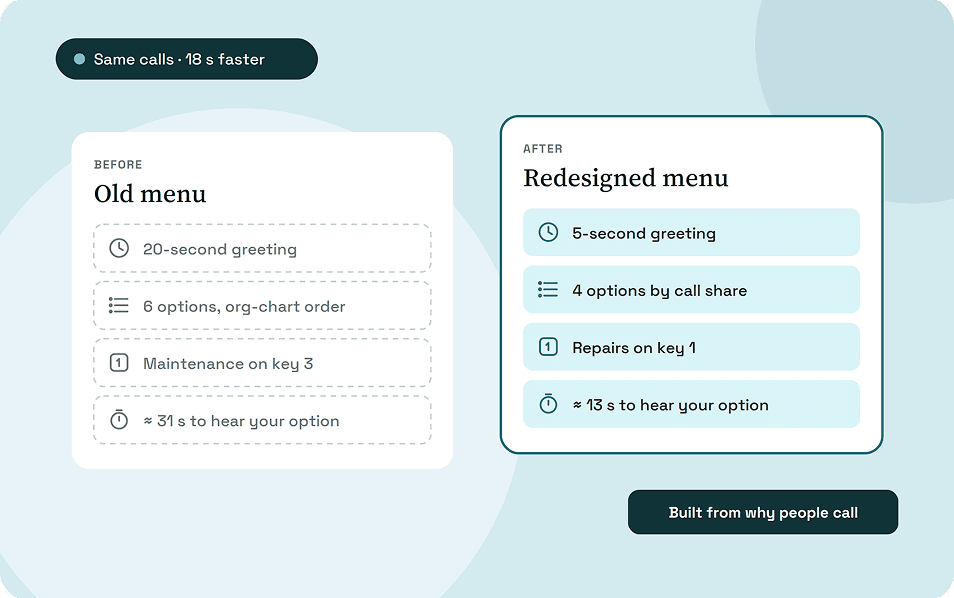
Take the same property company. Its old menu opens with a 20-second greeting, then lists six options in org-chart order:
Thank you for calling Parkside Property Management.
Did you know you can now pay your rent on our website? Our office is open Monday to Friday, 9 to 5.
For leasing, press 1. For accounts receivable, press 2. For maintenance, press 3.
For emergencies, press 4. For the management office, press 5. For the staff directory, press 6."
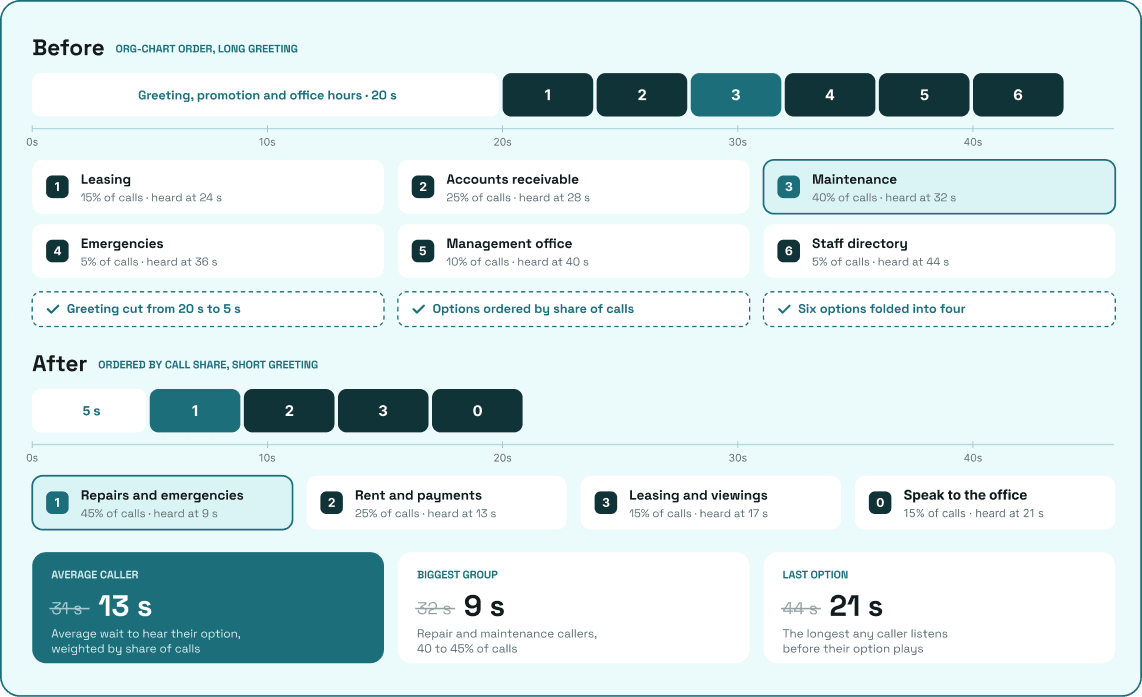
At about 4 seconds per option, a caller waits about 31 seconds on average before hearing their option, and 44 seconds if theirs is last. Maintenance callers, the biggest group, wait 32 seconds.
The redesign uses a 5-second greeting and four options ordered by the routing map:
Thanks for calling Parkside Property Management.
To report a repair or an emergency, press 1. To pay your rent or ask about a payment, press 2.
To book a viewing or ask about leasing, press 3. To speak to the office, press 0.
The average wait to hear an option drops to about 13 seconds, and the longest to 21. These are our own estimates, using the table's call shares and 4 seconds per option.
3. Keep it to a few options and no more than two levels
Callers hold every option in their head until they hear the one they want. Each extra option or level adds to that load and to the wait.
The six IVR design guides we reviewed agree on a few limits:
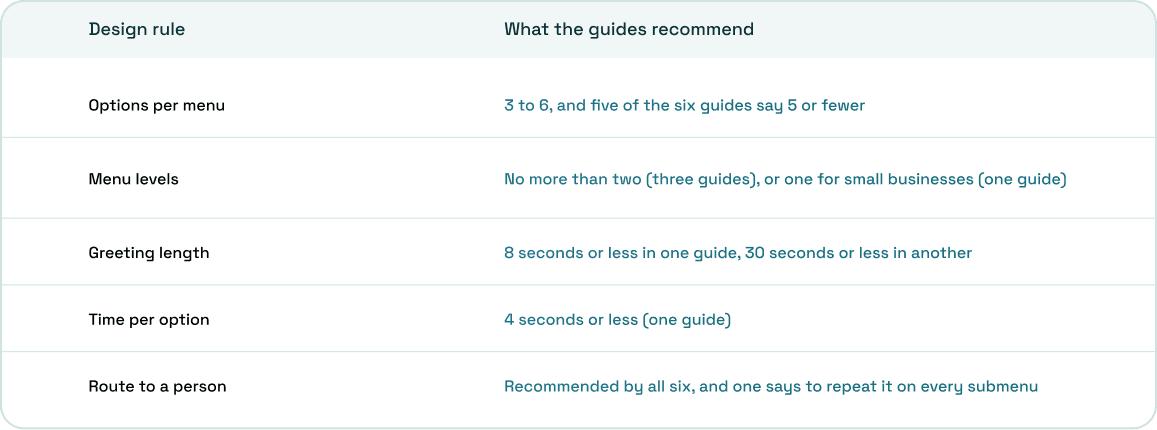
Add a submenu only when one option splits cleanly into two teams. If an option is rarely chosen, cut it or fold it into "everything else."
4. Cut everything before the first option
Anything that plays before the options delays every caller, on every call. A promotion that costs 10 seconds costs 10 seconds a thousand times a month.
Open with the business name, then go straight to the options. Leave out website plugs, opening hours during business hours, and "please listen carefully, as our options have changed." Time your greeting with a stopwatch, and cut until the first option starts within a few seconds.
5. Say the task before the key, in the caller's words
A caller should know which key is theirs the first time they hear it. Wording decides that more than the number of options does.
- Put the task first: "To report a repair, press 1," not "Press 1 for maintenance."
- Use the caller's words: "pay your rent," not "accounts receivable." Callers match options to their problem, not to your team names.
- Give each option one job. "For billing, payments, statements or account changes" makes callers stop and sort four ideas.
- Name teams and roles, not staff members, so a staff change doesn't mean re-recording the menu.
6. Make keys mean the same thing on every level
Callers who learn a pattern in the main menu expect it to work in every submenu. Breaking that pattern sends them to the wrong place.
Keep 0 as the route to a person everywhere, and use the same key on every level to repeat the menu or go back one step. Lay out every key on every level side by side before you record, and fix any key that does two different jobs.
7. Give every level a way to a person
A caller who doesn't fit any option will press a random key or hang up. A clear route to a person stops both.
Offer "to speak to someone, press 0" on the main menu and on every submenu.
8. Route every option to a team with a backup
An option that rings one person stops working the moment that person is on another call. Route each option to a team, and decide in advance where calls go when the team is busy.
Use the backup column of your routing map: a repair call rings the maintenance team, then the office team, then voicemail, and goes to an on-call number after hours.
If a team regularly can't keep up, give it a queue so callers wait in line instead of falling through to voicemail.
9. Design for wrong turns
Some callers will press nothing, press the wrong key or reach the wrong team. A good design gets each of them back on track in one step.
- No input: play a short prompt such as "Sorry, we didn't get a choice," repeat the options once, then send the caller to a person.
- Wrong key: say "That isn't one of the options," then repeat the menu.
- Repeated wrong keys: send the caller to a person instead of ending the call; two of the guides we reviewed advise this.
- Wrong team: the person who answers should warm-transfer the call with a note, so the caller doesn't explain their problem twice.
10. Don't ask callers for details nobody uses
Asking for an account or unit number only helps if the person who answers can see it. Otherwise the caller types it in, then says it again out loud.
Several of the guides we read list repeating information as a top caller frustration. If your menu only routes calls to teams, it doesn't need to collect any details at all.
11. Treat misroutes as design bugs
A misroute doesn't show up inside the menu. It shows up after the call is answered, when someone has to pass it on.
Look for three signs: transfers soon after a call is answered, calls that end inside the menu, and callers who press 0 more often than any option, which suggests no option fits. For one week, ask the team to note every call that reached them by mistake and what the caller said they wanted.
Reword the labels behind the biggest misroutes in the callers' own words, then check again in two weeks.
Designing your IVR in ArcSIP
ArcSIP includes a multi-level IVR in its business phone plan, set up as the call flow on any phone number. It's a keypad menu built to route callers to teams and people.
- Menus and submenus: each key rings a team or a user, or opens a submenu.
- Backups per option: if the team or agent is unavailable, doesn't answer, or it's after hours, the call goes to voicemail, forwards to a user, team or external number, or ends.
- Wrong turns: "no input" and invalid-input messages play when needed, and the call ends after three wrong inputs, so point both messages to 0.
- Warm transfers: live call notes travel with the call when it moves to the right team.
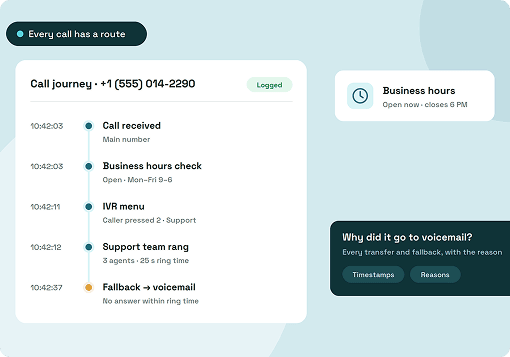
- Finding misroutes: Call Journey shows every transfer and fallback a call went through.
The IVR is included in ArcSIP Unlimited at $29 per user per month, with a minimum of three users. You can try it free for seven days without a credit card.
Design for the caller's first ten seconds
The order, wording and length of your first menu decide whether a caller reaches the right team quickly or gives up. That's where to start.
Build the routing map, cut the greeting, put the biggest group first and word each option the way callers talk. Then watch for transfers after the first two weeks, and let the misroutes tell you what to change next.