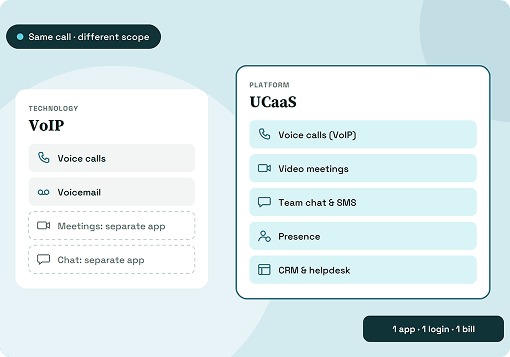




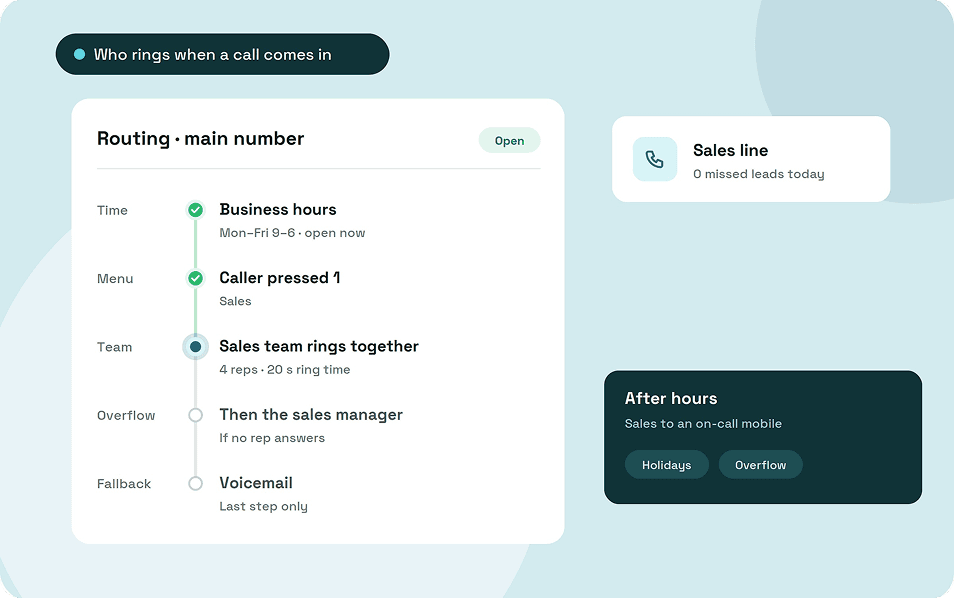
Call routing is the set of rules that decides where each incoming call goes. Sales teams route for speed and clear ownership of every lead, while support teams route to get callers to the right expertise on the first try.
Neither team needs every routing feature on the market. A good strategy combines two or three routing types, gives each one a fallback, and adds rules only when the call history shows a gap.
Key takeaways
- A routing type is a building block, and a strategy combines a few of them.
- Sales routing protects speed and ownership of every lead.
- Support routing gets callers to the right expertise the first time.
- Every route needs a fallback for busy hours, after hours and holidays.
- Small teams can route well with separate numbers, a short menu and a team that rings together.
What is call routing?
Call routing is the set of rules a phone system follows to decide who rings when a call comes in. It runs in the second or two before anyone picks up.
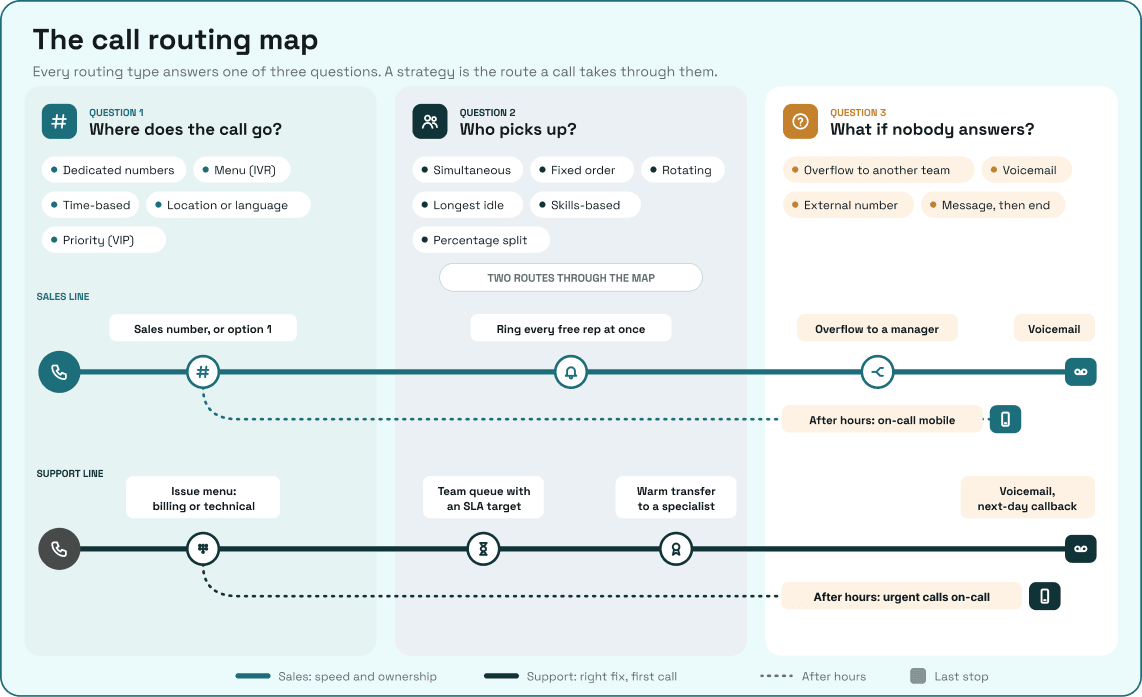
Every routing setup answers three questions. Who is calling and why, who is free to answer, and what happens if nobody does?
Call forwarding is the simplest version: every call goes to one fixed destination, such as a mobile. Routing applies rules to each call instead, so the same number can reach sales in the morning, support after a menu choice and an on-call phone at night.
Types of call routing
Each routing type answers one of those three questions. Knowing which question a type answers makes it easier to combine them without overlap.
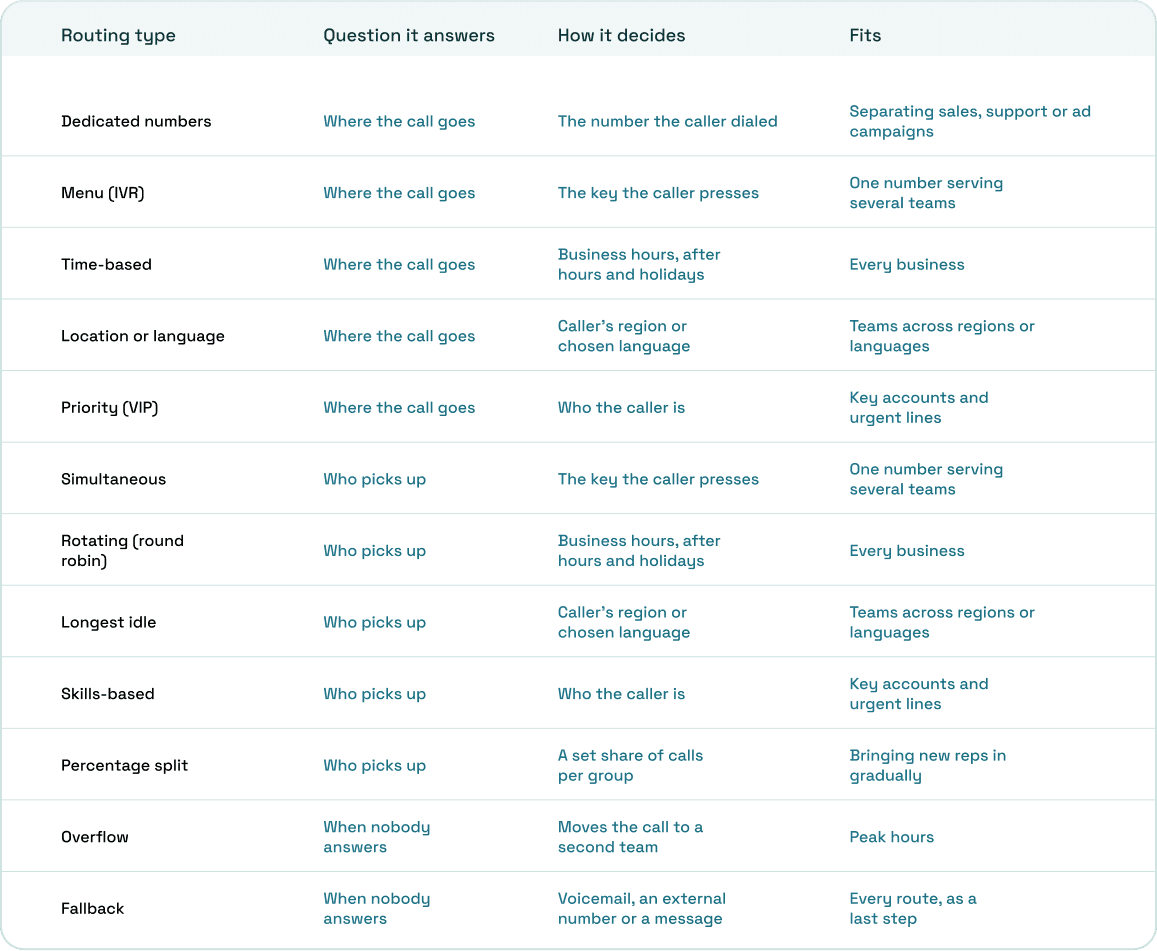
The "who picks up" methods decide how a call queue shares calls across a team. A menu needs its own design work, since its wording and order decide how fast callers get through it, as our guide on designing an IVR shows.
Call routing strategies for sales teams
A sales call is a lead that can go to a competitor if nobody answers. Sales routing protects speed and makes it clear who owns each caller.
1. Keep sales calls on their own line
Leads shouldn't wait behind billing questions or support calls. Give sales its own number, or make it the first option in your menu.
Separate numbers also show where calls come from. Two of the guides we read suggest using a different number for each ad or campaign, so you can count the calls each one brings in.
2. Choose between speed and fairness
Ringing every free rep at once gets a lead answered fastest. Rotating calls in turn is slower but gives each rep an even share, which matters when reps work on commission.
Pick one on purpose and tell the team why.
3. Send existing clients to their account owner first
A client who already has a sales contact expects to reach that person. Ring the account owner first, then fall back to the team if they don't answer.
This keeps the relationship with one person while making sure the call still gets picked up.
4. Keep leads out of voicemail during business hours
A lead who reaches voicemail during the day may call the next business on their list instead of leaving a message. Overflow unanswered sales calls to a second group, such as a manager or office staff, before voicemail.
After hours, forward sales calls to an on-call mobile, or play a message that says when someone will call back.
5. Bring new reps in gradually
New reps learn fastest on real calls, but a full share of leads can cost deals in their first weeks. One guide we read suggests a percentage split, such as 70% of calls to experienced reps and 30% to trainees, on systems that support it.
Call routing strategies for support teams
A support caller wants their problem solved on the first call. Support routing gets them to someone who can solve it, without a chain of transfers.
1. Sort calls by issue type up front
A short menu that separates, say, billing from technical problems sends each caller to the right team before anyone answers. Keep it to a few options, with the most common reason first.
Use the caller's words in each option, not your team names. "Problems logging in" is easier to pick than "Tier 1 technical".
2. Put each support line on a queue with a target
Support calls bunch up after an outage, a billing run or a product launch. A queue holds callers in order instead of sending them to voicemail when every agent is busy.
Set a ring timeout for the team and a service level target for the line, then watch the longest wait. A rising longest wait is the first sign the line needs more people.
3. Escalate through tiers, not through the menu
A menu can't know which problems need a specialist until someone hears them. Let generalists answer first, solve what they can, and warm-transfer the rest to specialists with a note.
This gives a small team the benefit of skills-based routing without tagging every agent. The caller explains the problem once, because the note travels with the call.
4. Give urgent callers their own line
Some calls can't wait in the same queue as routine questions, such as an outage report from a key customer. A separate number that rings a dedicated team, with a tighter target, keeps those calls moving.
5. Cover after hours by urgency
Not every after-hours call needs a person that night. Send urgent problems to an on-call number, send everything else to voicemail with a next-day callback, and set special dates for public holidays so the closed message plays on the right days.
When one team handles both sales and support
In a small business, the same people can end up answering both kinds of call. Routing for both on one team needs a clear rule for which call wins when both arrive at once.
- One number, two options. Put sales first in a short menu, because a lead who hangs up can go elsewhere, and have both options ring the same people.
- Two numbers, one team. Publish a sales number and a support number, and add the same staff to both teams so either line reaches them.
- Overflow both ways. When the sales team is busy, overflow to support staff after a set time, and the reverse.
- A written rule for peak hours. Decide in advance which line gets answered first when both are ringing, so staff don't choose by habit.
When call volume grows, split into separate sales and support teams. Callers keep dialing the same numbers, and only the team behind each one changes.
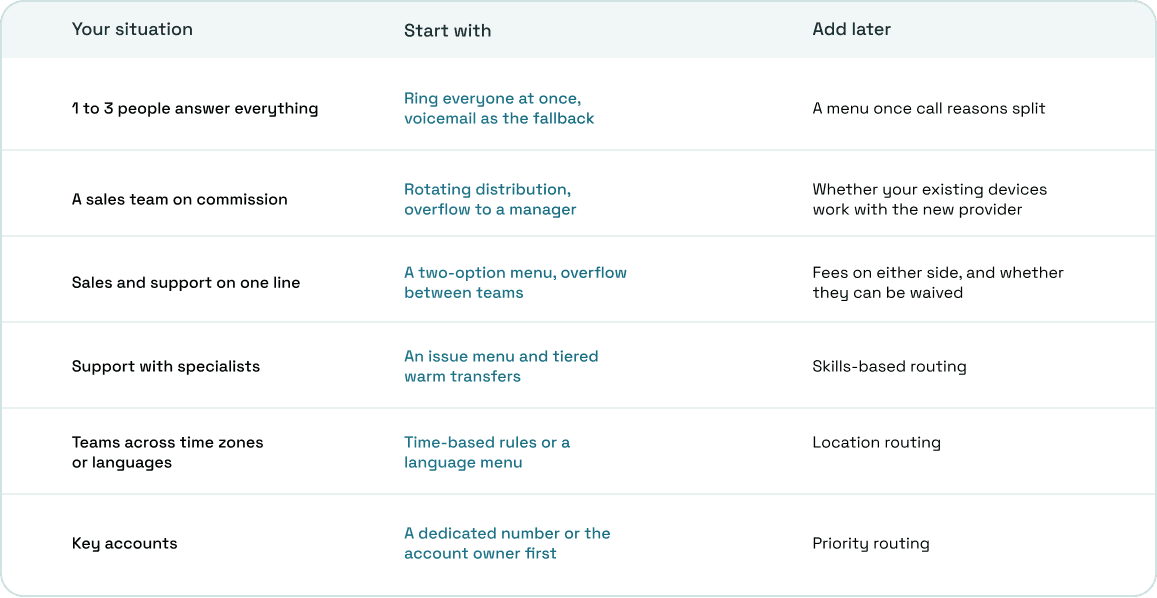
How to choose a routing strategy
The right strategy depends on how many people answer and what callers want. Start with the simplest setup that fits and add a rule only when your call history shows a problem.
How to tell if your routing works
Sales and support measure success differently. Watch the numbers that match each team's goal, not one set for both.
For sales, track missed calls and time to answer for each number and campaign, since a missed lead costs more than a slow one. For support, track the service level, transfers after a call is answered and callers who ring back about the same problem.
For both teams, count calls that reach voicemail during business hours. Each one is a caller your routing didn't get to a person while you were open.
Call routing in ArcSIP
ArcSIP runs call routing for sales and support teams from one platform, alongside the business phone system the rest of the company uses. Every number gets its own call flow, hours and fallbacks.
- Four call flows per number: Ring to Agent, Ring to Team, a multi-level IVR menu, and Forward to Number, which plays a call forwarding announcement before the call connects.
- Hours and holidays: business hours, after-hours rules and special dates per number. During hours, an unanswered call goes to voicemail, another agent or team, or ends. After hours, it plays a message or forwards to an agent, team or external number.
- Team ringing: every available team member rings at the same time until the team's ring timeout, and staff can belong to more than one team.
- Transfers: warm or blind transfer to a user, team or external number, with live call notes, plus Transfer to Queue.
- Targets and visibility: SLA targets per number, user and team, a live dashboard with the longest wait in queue, missed and dropped calls, and Call Journey showing every transfer and fallback.
ArcSIP Unlimited costs $29 per user per month with a minimum of three users, and includes routing, queues and unlimited call concurrency. You can try it free for seven days without a credit card.
Start with the calls you can't afford to miss
A routing strategy doesn't need every rule on day one. It needs a clear path for the calls that matter most to each team.
Route sales calls for speed and ownership, route support calls for the right fix on the first call, and give every route a fallback. Then let the missed calls and transfers tell you which rule to add next.