



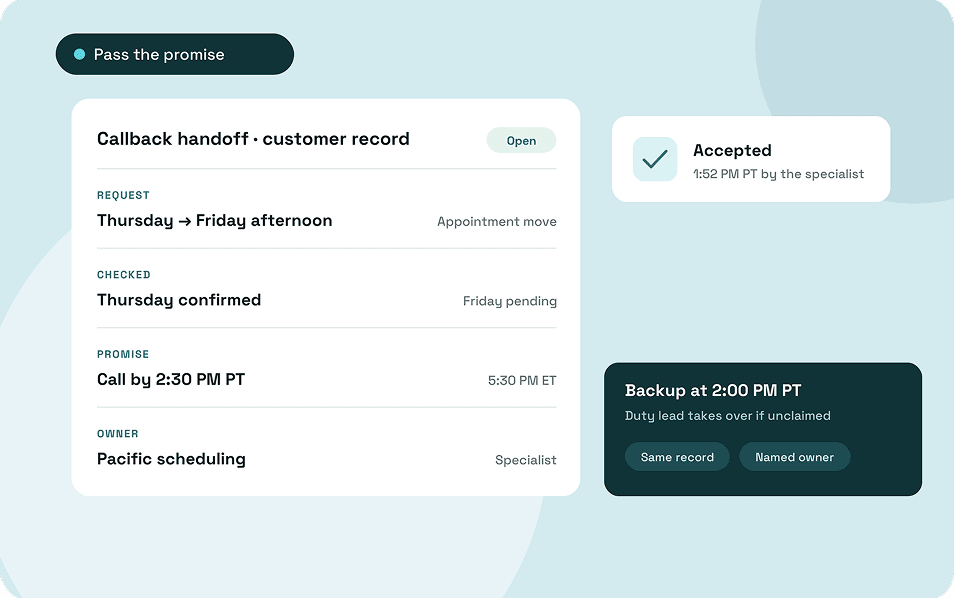
A customer calls to move Thursday’s appointment. The coordinator can confirm the existing booking, but a colleague on the next shift handles Friday’s schedule. Before signing off, the coordinator needs to find out who can check for an opening and call the customer back.
Remote team communication shapes what happens between those two calls. A message in team chat can help the next shift spot the request. It’s easier to pick up when the coordinator also records what they’ve already checked, when the customer expects to hear back, and who has agreed to call.
The same remote team communication strategies apply to routine approvals and policy changes. A colleague who missed the original conversation needs somewhere to check what was agreed and enough information to act on it.
Key Takeaways
- Agree on where common requests go, who should respond, and when the sender should ask someone else for help.
- Record decisions where employees will use them. Include when a change takes effect and how it applies to work already in progress.
- Use the time employees share across shifts for decisions or customer issues that need both teams involved.
- Give shared business numbers a coverage schedule and a fallback. Confirm who owns a callback before promising the customer a response time.
- An unanswered call tests where your phone system sends the caller. An unclaimed callback tests whether someone takes over before the customer’s deadline.
What Is Remote Team Communication?
Remote team communication is how employees in different locations share information, make decisions, and coordinate work. For a customer-facing business, it includes conversations with customers and the exchanges between colleagues who help resolve their requests.
Some of that work is synchronous. People take part at the same time, as they would on a call or in a meeting. Asynchronous communication gives people time to read or respond later. A ticket update, written approval, or recorded walkthrough can reach colleagues who are busy or off shift.
The same piece of work can use both. Operations and support might discuss an order policy on a call and then update the instructions employees use to answer customer questions. The conversation helps the teams reach a decision, and colleagues who missed the call can refer to the updated policy.
Where Remote Team Communication Gets Difficult
Start with a few requests that took longer than expected. Find out what the employee was waiting for. They may have needed an answer from another shift, the latest version of an instruction, or permission to make a decision. Each calls for a different fix.
Working Hours Only Overlap for Part of the Day
A written update can carry routine work forward. A decision that needs input from two teams may have to wait until both are available. Agree on which exceptions the person on duty can handle and when they’ll need a manager. A scheduling coordinator, for example, might be able to offer the next available appointment but need approval to make an exception to the booking policy.
People See a Request Without Knowing Who Owns It
Several people might see that a customer needs a callback and assume a coworker has picked it up. Assign the next step to one person and ask them to acknowledge it. If the request is still open when their shift ends, the duty lead should know whether they’re expected to take it or pass it to someone else.
Teams Have Different Versions of a Decision
A manager explains a change on a call, someone summarizes it in chat, and the old instructions stay in the handbook. The next shift may have a good reason to follow the old instructions. When a decision changes how people work, give someone responsibility for updating the instructions and sharing the revised version with the people who use them.
Call Routing Falls Out of Step With Staffing
The schedule may show that someone is covering the last few hours while the phone number still rings employees who’ve signed off. When coverage changes, place a call from outside the business. Check who gets it and where it goes if that person can’t answer.
How to Communicate With Remote Teams Across Channels and Shifts
What happens while a request waits can help you choose a channel. If a customer is on the phone and needs a specialist, the employee answering needs a way to reach someone right away. A question about next week’s schedule can go where the person responsible will see it during their next shift.
Use the requests your team handles most often to set response times. For each one, decide where it goes, who should respond, and how long the sender should wait before asking someone else. The customer’s deadline or the effect on a coworker’s work can help you set a reasonable window.
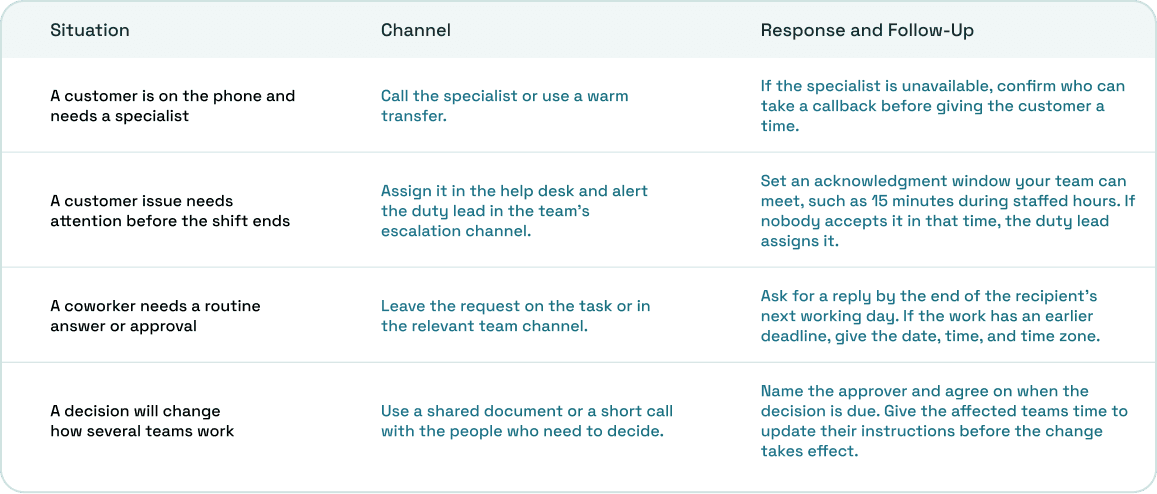
Agree on what counts as a response. If the scheduling specialist needs time to check Friday availability, they can reply, “I’ll take this and update you by 2:15 p.m. Pacific.” The coordinator now knows someone is handling it and has a basis for agreeing on a callback time with the customer.
Keep your remote team communicating best practices with the instructions staff already use during a shift. A pinned guide can hold the response windows, the escalation contact, and a link to the coverage schedule. If departments have developed different expectations over time, work through Atlassian’s team communication norms exercise together before settling on the rules.
Record Decisions Where Employees Will Use Them
If operations approves a new order cutoff, the next support shift needs to know when to start quoting it and how to handle orders already accepted. Put the decision alongside the policy staff refer to when they answer order questions. That’s where a colleague who missed the discussion is most likely to look.
A short entry can give operations and support enough information to make the change.
- The same-day order cutoff moves to 2 p.m. Eastern starting Monday.
- Operations updates the customer help page. Support updates its saved replies before Monday’s opening shift.
- Orders accepted under the previous cutoff keep the original promise.
- Operations will confirm by Tuesday how the rule applies to partner orders.
Share the link in chat so staff know something changed. When operations settles the partner-order question on Tuesday, update the same record. An employee answering on Wednesday can then see the current policy and its exceptions together.
Use the same approach for smaller decisions. If two people agree to move a delivery, update the delivery record with the new date. A coworker can find the answer while working on the request, even if they never saw the original conversation.
Use Overlapping Hours for Work That Needs a Conversation
When two shifts share only a short part of the day, employees can post routine updates before that window opens. The time together can go toward requests that need both groups, such as checking whether the next shift can keep a customer commitment or agreeing on an exception to a policy.
In their study of 61,182 US Microsoft employees, Yang and colleagues found that the shift to company-wide remote work in early 2020 made collaboration networks more siloed and shifted communication toward asynchronous channels. When you move routine updates out of meetings, keep some time for teams that still need to make decisions together.
Say your Eastern and Pacific teams have 30 minutes of scheduled overlap. The Eastern lead can post the open issues beforehand. The two leads can then confirm which customers need an update that day and which requests the Pacific shift can take. On a quiet day, that may only take a few minutes.
For recurring meetings that can’t fit everyone’s hours, rotate the time where practical. A separate study of 20 million meetings at Microsoft found that cross-time-zone meetings often fell in early mornings or late evenings, with the burden unevenly distributed. The researchers also found that those meetings connected colleagues who were farther apart in the organization. Keep the conversations that benefit from live participation and consider who routinely has to adjust their hours to attend.
Set Customer Call Coverage Around the People Working
Customers will keep using the number they already know.
Suppose your business publishes an 8 p.m. Eastern closing time and the Eastern team signs off at 5 p.m. Eastern. The Pacific team can start at 1:30 p.m. Pacific for a 30-minute overlap, then take the main line from 2 to 5 p.m. Pacific. The two teams get time to review open requests before the phone coverage changes.
A shared number is useful for work several employees can handle, such as appointments, order updates, and general support. Direct numbers can make sense for employees who manage ongoing customer relationships. A business phone system connects each number to the people or teams responsible for answering it.
For the shared number, decide what callers should experience at three points in the day.
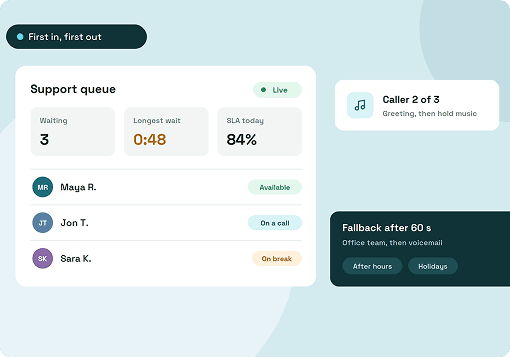
- During Eastern coverage: The Eastern team answers. If nobody picks up, the caller reaches the agreed backup or voicemail.
- During Pacific coverage: The Pacific team answers new calls. Its duty lead also reviews callbacks carried over from the earlier shift.
- After closing: The caller hears the after-hours greeting and reaches the configured destination. If they can leave a message, tell them when the team expects to review it.
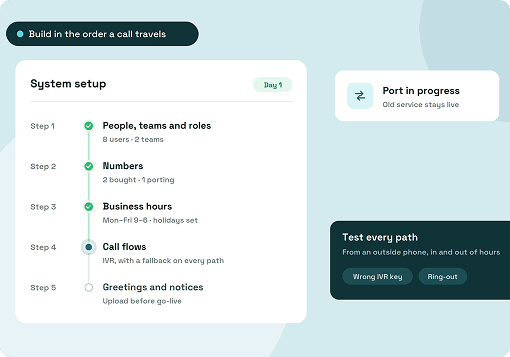
When you set up call routing for remote teams, test two staffed-hours cases from an outside number.
- Employees are signed in and available, but let the call ring. Check how long it rings and where it goes when nobody picks up.
- Nobody on the scheduled team is signed in. Check what the caller hears and which destination the system uses when there’s nobody to ring.
Repeat the test around shift change, then check the after-hours route separately. The business phone system installation guide covers configuring and testing those paths when you’re setting up the number for the first time.
Give the Next Shift Enough Information to Take Over
In the appointment example, the customer calls at 4:40 p.m. Eastern / 1:40 p.m. Pacific, while both shifts are working. The Eastern coordinator confirms Thursday’s booking and checks whether the Pacific scheduling specialist is available. If the specialist can help, the coordinator can speak to them through a warm transfer, explain what the customer needs, and then connect the caller.
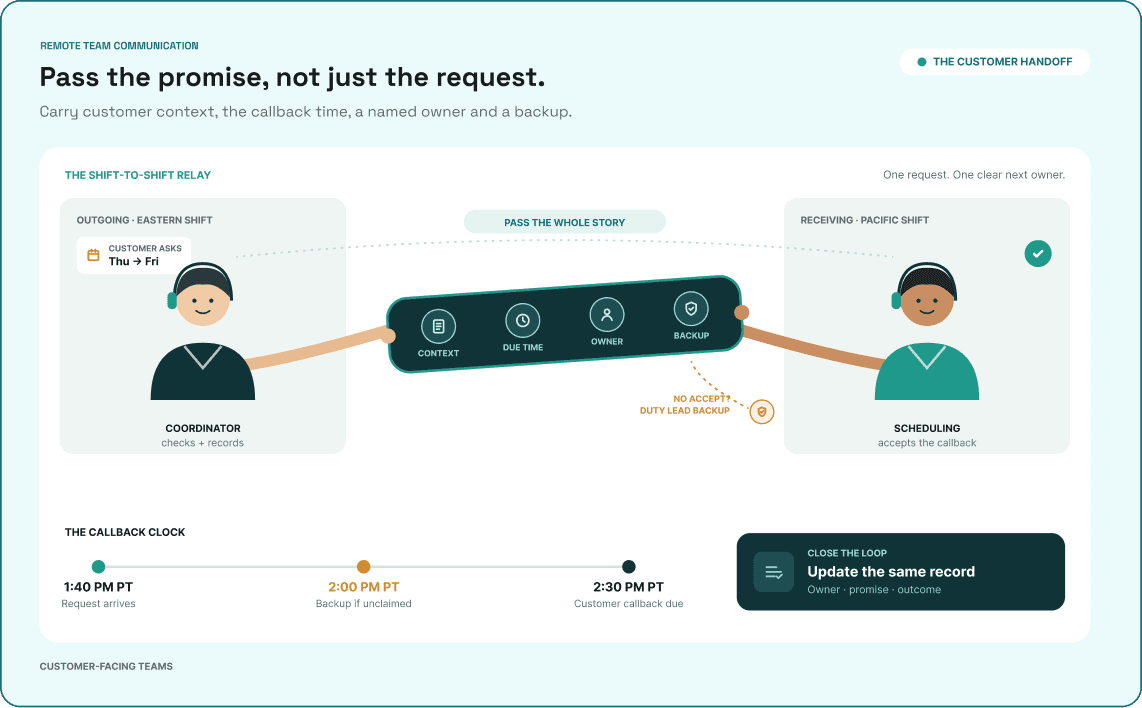
If the specialist is busy, the coordinator checks with the Pacific duty lead before promising a callback. The lead confirms someone can call and keeps an eye on the request until the specialist accepts it. The coordinator leaves a note in the customer record.
- Request: Move Thursday’s appointment to Friday afternoon.
- Already checked: Thursday’s booking is confirmed. Friday availability is pending.
- Customer promise: Call by 2:30 p.m. Pacific / 5:30 p.m. Eastern, even if a new slot is still pending.
- Receiving owner: Pacific scheduling specialist.
- Backup: The Pacific duty lead takes over if the specialist hasn’t accepted by 2 p.m. Pacific.
- Outcome: Record the new appointment or the next step agreed with the customer.
If the specialist hasn’t accepted by 2 p.m. Pacific, the duty lead still has half an hour to make the call or find someone who can. The GitLab support ticket transfer workflow takes a similar approach to confirming responsibilities and timing with the receiving team before making a customer commitment.
When you onboard a remote employee to your business phone system, give them a chance to try that handoff before their first shift. Check that they can access the right team line, receive and transfer a call, and find out who owns a callback if they miss it.
Choosing Remote Team Communication Tools
Give each tool a job employees can recognize. Use business calling for customer calls and transfers, team chat for quick coordination, and a ticketing system or CRM for open customer requests and callback deadlines. Keep procedures and decisions in shared documents that employees can find later. Use video or screen sharing when people need to look at the same thing together. One tool can cover several of these jobs.
Before buying something new, ask two employees in different locations to work through a real request using what they have today. If they take calls in their browsers, have them test from the devices and networks they’ll use at work. A WebRTC softphone uses the browser for call audio. Check microphone access and headset selection, then test an outbound call and a separate inbound call from outside the business.
Once calls work in both directions, have one employee pass a callback to a coworker who’s unavailable. See whether the backup finds the request and can tell what the customer was promised. If they have to ask around, check whether the team is missing a way to share the information or simply needs to agree on where it goes.
Metrics to Review After the First Week
Look at a few real requests with the employees covering both shifts. Use the same time windows each week so you can compare the results after making a change.
- On-time callback rate. Callbacks completed by their promised time ÷ all callbacks due that week, including ones still open.
- Open follow-ups without an accepted owner. Count them at shift change. Look for requests sent to a team or individual without anyone confirming they’d take them.
- Voicemail rate during staffed hours. Inbound calls that reached voicemail ÷ all inbound calls during the same staffed hours. Check when those calls occurred and where the system sent them first.
If more calls reach voicemail around shift change, look at where they went and who was available. When calls reach the right team and callbacks still go late, review how employees accept them and decide what to handle first. Those examples also give you something concrete to test when you evaluate a business phone system.
How ArcSIP Supports Remote Teams That Handle Customer Calls
If your team uses several remote communication tools, ArcSIP’s remote communication platform can handle business calls, internal chat, and shared contacts in one workspace. Employees can make and receive calls through a supported browser. Administrators can set business hours for each number and configure where unanswered calls go.
In the Eastern and Pacific example, customers keep calling the published number while the configured call flow sends them to the team covering that part of the day. When a coworker needs to take over a live call, the employee who answered can brief them through a warm transfer. Staff can also refer to shared contacts, call history, and available notes before speaking with the customer.
If nobody answers, ArcSIP sends the call to the configured fallback. Voicemail-to-email can notify staff when a caller leaves a message, and managers can use Call Journey to review routing, transfers, and fallbacks. For a callback, staff record who owns it, when it’s due, and what happened in the ticket or customer record their team uses.
Wrapping Up
The next time your team changes shifts, sit with the person taking over and look through a few open customer requests together. Pay attention to what they have to ask you. They may be able to find the call and still need help figuring out what was promised or who’s handling it.
Pick the problem that comes up most often and make one change. Give it a few days, then see how it holds up on a busy afternoon.
- If calls keep reaching the wrong team, test the main number just before and after the shift change. Write down who should receive each call and compare that with what actually happens.
- If callbacks sit unclaimed, give the incoming shift a time to accept them and have the duty lead pick up anything still open at that point.
- If customers have to explain their request again, keep what they asked for, what the first employee checked, and what they were promised together in the customer record.
If you’re working out how to cover one business number across several locations, you can book an ArcSIP demo. Bring your coverage schedule and one recent handoff so you can walk through the way your team already works.