



At 5 p.m. Eastern, the employees who’ve been answering the main number finish their shift. Their Pacific colleagues are already working and can take the next call. If the phone system still rings the Eastern team, a customer can reach voicemail while someone is available to help.
The same number needs to work on a busy afternoon, when everyone is already on a call, and on a holiday, when the usual schedule doesn’t apply. These are easy situations to overlook when the first test is simply checking whether a colleague’s phone rings.
The call routing best practices that matter here start with your staffing schedule. Decide who should receive a call at each point in the day, how long it should ring or wait, and where it should go if the scheduled team can’t answer. Then call the number yourself and see how the plan holds up.
Key Takeaways
- Use one time zone for the main number’s published hours. Show each shift when it takes over in its local time.
- Choose a ring group when several employees can handle the same calls. Use a queue when callers can reasonably wait for someone to become available.
- Test what happens when available staff let a call ring, when nobody is available to ring, and when a caller reaches the queue’s wait limit.
- Give every voicemail or backup destination a person who checks it. Reaching the mailbox is only one part of the caller’s experience.
- Test the main number from an outside phone around shift changes, after closing, and when the usual team is unavailable.
What Is Business Call Routing?
Business call routing is how a business phone system decides where to send an incoming call. It can use the number dialed, the time of day, a caller’s menu choice, or employee availability to send the call to a person, team, queue, or voicemail.
Call forwarding is one action the system can take within those rules. For example, you could forward calls to an answering service after hours. The call flow includes the full path the caller takes, including the greeting, the initial destination, and what happens if that destination can’t take the call.
Start with the number customers use most often. If you can describe where that number should ring during regular hours, at shift change, and after closing, you have enough to sketch the first version of the flow.
Set Business Hours and Shift Coverage for the Main Number
The people answering the phone need to know when coverage changes. The phone system needs the same schedule, in the same time zone. If your website publishes hours in Eastern time, use Eastern time for the main number and show each team the equivalent in its own time zone.
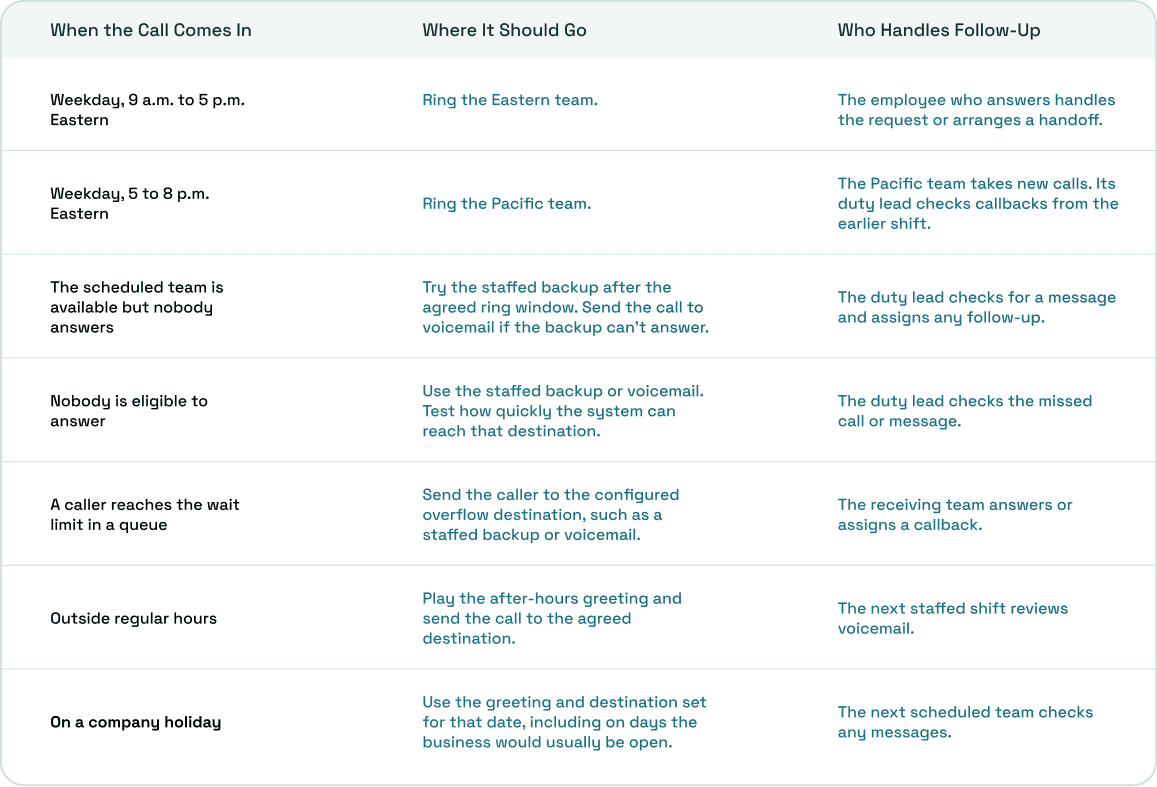
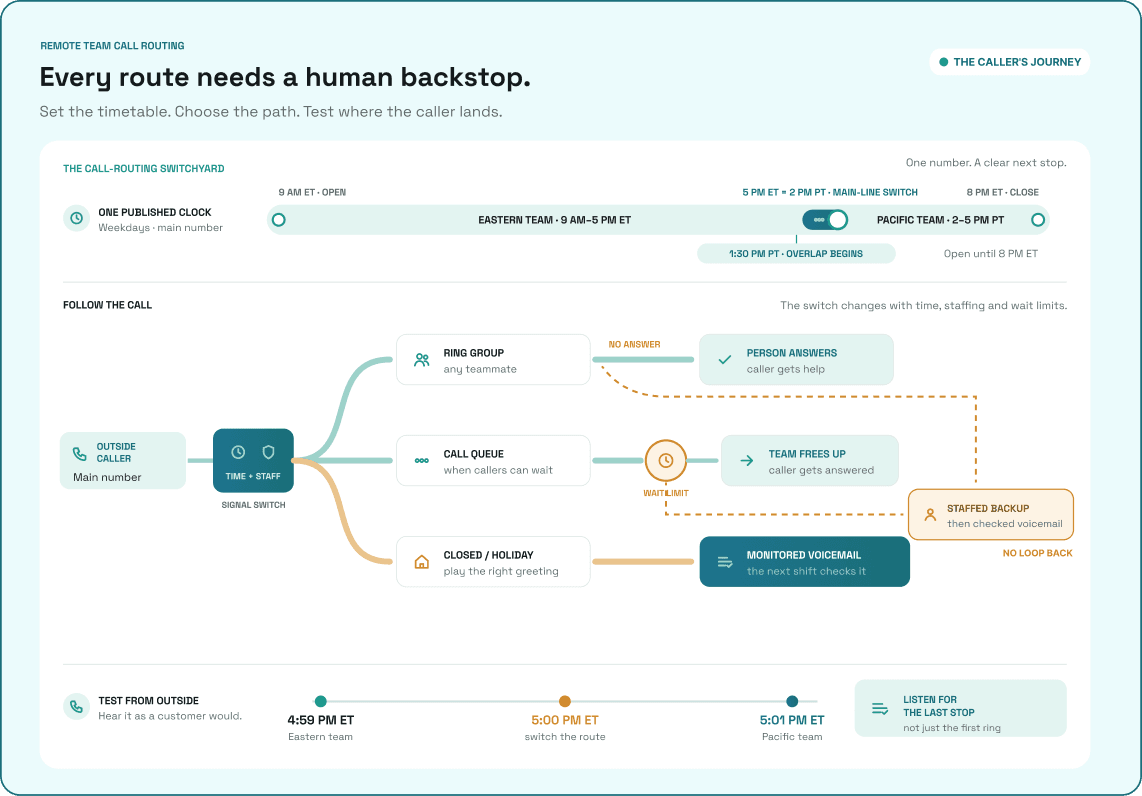
Take the service business from our remote team communication guide. Its main number is open on weekdays from 9 a.m. to 8 p.m. Eastern. The Eastern team answers until 5 p.m. Eastern. The Pacific team starts at 1:30 p.m. Pacific, so the two teams have half an hour to review open requests before the Pacific team takes the main line from 2 to 5 p.m. Pacific.
The overlap also gives the Eastern team a chance to pass along callbacks. At 5 p.m. Eastern, new calls start going to the Pacific team. A callback someone already promised stays with that employee until a colleague accepts it or the duty lead takes over. That prevents the change in phone coverage from leaving open requests behind.
Review holidays and early closings alongside the regular schedule. For each exception, write down when it starts, what callers should hear, and when someone will review any messages. Test the exception on a date that would normally be open so you can see which rule the system applies.
Choose Between a Ring Group, Phone Menu, and Call Queue
Look at what customers typically need when they call. If most are asking about appointments, a small team may be able to answer the same kinds of questions. If callers regularly need one of several departments, or several calls arrive while employees are already busy, the flow may need another step.
- Direct route: Send the call to one person. This suits a dedicated account contact or a role with its own number. Choose a backup for days that person is away.
- Ring group: Offer the call to several eligible employees. Depending on your settings, the system might ring them together or in order. This works well when any available teammate can handle the request.
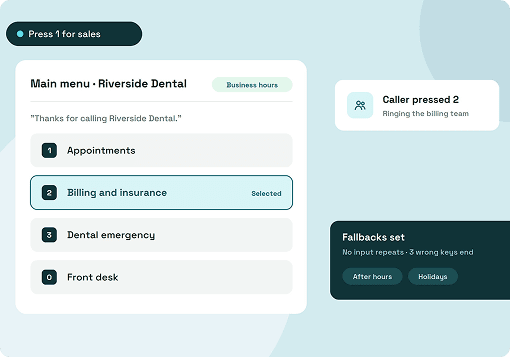
- Phone menu or IVR: Let the caller choose between destinations such as scheduling and billing. Keep the choices close to the reasons people actually call. Give callers somewhere to go if they make no selection or press an invalid key.
- Call queue: Let callers wait for an employee to become available. Agree on how long the team is comfortable asking people to wait and where callers should go once that time runs out.
A ring group determines who gets the chance to answer. A queue also gives the caller time to wait for someone to become free. If you use both, check the timers carefully. The time a call rings one employee can be separate from the total time the caller spends waiting. Listen from the caller’s side to find out how long the whole path takes.
Plan for Calls the First Team Can’t Take
There are a few ways a call can go unanswered. Employees may be signed in and available but let the call ring. Everyone assigned to the number might be busy, signed out, or otherwise ineligible to receive it. If callers can join a queue, someone may also wait until the configured limit.
Give each situation an intended outcome. A business might allow its first team 20 seconds to answer and then try a staffed backup. If nobody is eligible to ring, it might want the call to reach that backup sooner. The exact behavior depends on the provider and the settings you use.
The table below puts the service business’s schedule and fallbacks in one place. It’s a plan for what the team wants callers to experience, with sample destinations you can adapt to your own coverage.
Check the backup as a destination in its own right. If it forwards unanswered calls back to the main number, a caller can end up going through the same route again. Follow the call until someone answers or it reaches a mailbox that a named person checks.
Test the Call Flow From Outside the Business
An internal call can tell you whether a colleague is reachable. An outside call lets you hear the same greeting, wait through the same ringing, and reach the same destination a customer would. Use a test number or controlled window for scenarios that require making the whole team unavailable.
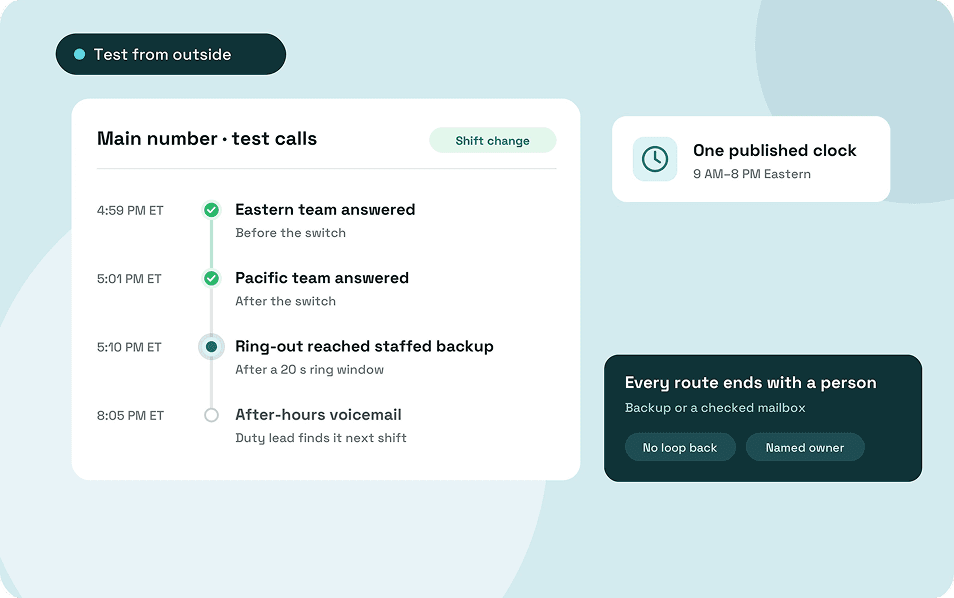
- Call just before and after the shift change. In this example, a call at 4:59 p.m. Eastern should reach the Eastern team. A call at 5:01 p.m. should reach the Pacific team.
- Let the scheduled team ring out. Keep employees signed in and available. Check how long the call rings, who gets it next, and what happens if the backup also lets it ring.
- Try again with nobody available. Check whether the caller reaches the same fallback and whether the delay changes. If the two cases behave differently, record both results.
- Check the closed-hours and holiday routes. Listen to the greeting and leave a test message. Ask the person scheduled to check messages to find it and confirm when they’d return it.
- Test the menu or queue if you use one. Try each menu option, an invalid key, and no selection. For a queue, let a call wait through the configured limit and see where it goes.
Keep a simple test record with the number dialed, the time and time zone, the expected destination, and what actually happened. If a call reaches the correct employee but their browser doesn’t ring, check how browser-based business calling works before changing the route. When you onboard remote employees to the phone system, let them answer a test call on the shared line and show them what happens when they miss one.
What to Review After the First Week
Look at calls around the points where coverage changes. If voicemail increases just after 5 p.m. Eastern, pick a few calls and see whether they reached the Pacific team. If they went to the wrong destination, check the number’s schedule. If they reached the right team, look at whether employees were available and whether the backup had enough time to answer.
For a team that uses queues, check how calls ended as well as where they went. A call can leave the queue through overflow and still get answered by the backup. An abandoned call is one the caller ended while waiting. Use your own provider’s definitions when reviewing the numbers.
How to Set Up Business Call Routing in ArcSIP
Start by assigning the number to the employee or team that should receive it. The ArcSIP guide to assigning a call flow walks through opening Phone Numbers, editing the number, and selecting a template or custom flow under Call Flow. For team-assigned numbers, the documented options include Ring to Team, a call menu, and forwarding to another number. Saving applies the flow immediately, so have someone ready to place an outside call when you change an active line.
The business phone system installation guide explains how per-number business hours, special dates, and after-hours fallbacks fit into the setup. If the test call goes somewhere unexpected, use Call Journey to review the route, transfers, and fallbacks. Teams that need waiting calls and live visibility into queues and wait times should review ArcSIP’s call center solution.
Wrapping Up
Give the person taking over the main number a short page they can use during the shift. Include when the route changes, where unanswered calls go, and who checks the resulting messages. Ask them to use that page to make a test call. Anything they have to ask you is worth adding while you’re both there.
When the schedule changes, have the incoming lead write down what they expect before dialing. That gives them something specific to compare with the result and something the next person can use if a customer reports a problem.
- At the shift boundary, call before and after the switch. If the wrong team answers, check the number’s time zone and schedule first.
- During staffed hours, let one call ring out. Time how long it takes to reach the backup, then ask the backup what they received.
- After closing, leave a test message. Have the next person on duty find it and show where they’d record the callback.
If you’re setting up coverage across locations, bring that one-page plan to an ArcSIP demo. Walking through an ordinary call and a call that needs a fallback gives you a clearer sense of how the setup would work for the people answering your phones.